
Our UpCloud Hosting Review & Analysis for 2026

 By:
By: Table of Contents
- Quick Facts
- What Is UpCloud?
- Plans, Pricing, and Overall Value
- Performance and Speed
- Ease of Use and Setup
- Developer and Advanced Features
- Security, SSL, and Backups
- Customer Support
- Scalability and Flexibility
- Data Centers and Global Reach
- Who Is UpCloud Best For?
- How We Evaluated UpCloud
- Scoring Breakdown
- Top Alternatives
- Final Verdict
- Frequently Asked Questions
Pros
- Low-cost Starter cloud servers begin at $3.50/month with a public IPv4 address included
- Premium cloud servers include MaxIOPS storage, 1 Gbps networking, and a 99.999% uptime SLA
- Transparent, fixed monthly pricing with hourly billing capped at a predictable monthly amount
- Zero-cost outbound transfer under UpCloud’s Fair Transfer Policy, reducing the risk of surprise bandwidth bills
- Strong European and Nordic footprint, with global data centers across Europe, the United States, Asia-Pacific, and Australia
- Good fit for developers, agencies, SaaS projects, self-hosters, and technical website owners
- Useful cloud services beyond basic VPS hosting, including object storage, managed databases, Kubernetes, load balancers, NAT, VPN, and private networking
- Customer sentiment is generally positive around performance, support quality, transparent pricing, and ease of VPS deployment
Cons
- No true shared hosting or beginner-friendly cPanel hosting product by default
- No permanent Always Free VPS tier comparable to Oracle Cloud Always Free
- Starter plans use Standard storage and are better for development, testing, and lighter workloads than production-critical sites
- Premium plans can cost more than bargain VPS providers such as Hetzner, Netcup, Contabo, or some low-cost regional hosts
- Starter and Premium servers continue billing when powered off; users must delete resources to stop those charges
- Cloud Native pricing is more flexible but less beginner-friendly because storage and some resources are billed separately
- Not as broad as AWS, Google Cloud, Azure, or Oracle Cloud for advanced enterprise services
- Users who want managed WordPress, built-in email, phone support, or hand-holding may prefer a traditional web host
Ready to try UpCloud?
If you want a fast, developer-friendly cloud VPS platform with predictable pricing, useful cloud features, and no traditional egress overage fees under fair-use rules, UpCloud is worth considering. Just make sure you understand the difference between self-managed VPS hosting and fully managed website hosting before relying on it for important sites.
Quick Facts
| Provider | UpCloud |
|---|---|
| Hosting Type | Cloud VPS, cloud servers, block storage, object storage, managed databases, networking, Kubernetes, GPU servers, and private cloud infrastructure |
| Starting Price | $3.50/month for the smallest Starter Cloud Server |
| Free Tier | No permanent Always Free VPS tier; UpCloud commonly offers a limited free trial or trial credits for new users |
| Main Cloud Server Tiers | Starter, Premium, and Cloud Native |
| Entry Starter Plan | 1 GB RAM, 1 vCPU, 10 GB Standard storage, 250 Mbit/s bandwidth, public IPv4 included, $3.50/month |
| Entry Premium Plan | 1 GB RAM, 1 vCPU, 25 GB MaxIOPS storage, 1 Gbps network, public IPv4 included, $6/month |
| Cloud Native Starting Point | 4 GB RAM and 1 vCPU from $14/month for compute, with storage and some resources added separately |
| Outbound Bandwidth | Zero-cost outbound transfer under UpCloud’s Fair Transfer Policy; high usage may be throttled rather than billed with overage fees |
| Billing Style | Hourly billing with fixed monthly caps; Starter and Premium continue billing while shut down, while Cloud Native compute bills only while powered on |
| Control Panel | UpCloud Control Panel, API, CLI, Terraform provider, and developer tools; no default cPanel |
| Managed Hosting Available | Not in the traditional shared-hosting sense; managed databases, managed Kubernetes, object storage, and cloud networking services are available |
| Root Access | Yes, on Cloud Servers |
| Operating Systems | Linux distributions and Windows Server options depending on plan, region, and image availability |
| Best Known For | Fast VPS deployment, MaxIOPS storage, European cloud positioning, transparent pricing, and zero-cost egress under fair-use rules |
| Support | 24/7 customer support, documentation, tutorials, status page, and developer resources |
| Best For | Developers, agencies, startups, SaaS builders, Linux users, self-hosters, and businesses that want cloud VPS infrastructure without hyperscaler complexity |
Bottom line: UpCloud is a strong cloud VPS provider for technical users who want speed, predictable pricing, and more cloud features than a bargain VPS host. It is not the best choice for beginners who want a managed WordPress dashboard, bundled email, or a classic cPanel shared-hosting experience.
What Is UpCloud?
UpCloud is a European cloud infrastructure provider that offers self-managed cloud servers, storage, networking, databases, Kubernetes, GPU resources, and private cloud services. In ordinary hosting terms, UpCloud is closest to a VPS provider, but with more cloud-native features than a simple budget VPS company.
The most relevant product for most users is UpCloud Cloud Servers. These are virtual machines with configurable operating systems, root access, public networking, private networking options, and attached storage. You can use them to host WordPress, Joomla, Laravel, Node.js apps, Python apps, Docker containers, APIs, dashboards, databases, VPN endpoints, development environments, staging servers, game servers, or internal tools.
UpCloud’s positioning is different from traditional web hosts. A shared host might sell a “WordPress hosting” plan with cPanel, email accounts, a one-click installer, and a beginner dashboard. UpCloud sells infrastructure. You deploy a server, install the software stack, configure firewall rules, point DNS, set up SSL, manage updates, and decide how backups should work.
That self-managed model is a strength for developers and technical site owners. It gives you control, portability, root access, and a cleaner server environment than crowded shared hosting. It is also a weakness for beginners, because the platform assumes you are comfortable with server administration or willing to use a control panel, deployment script, or managed-service layer on top of the VPS.
The biggest recent change is UpCloud’s simplified Cloud Server lineup. Starter plans target development, testing, self-hosting, and lower-cost workloads. Premium plans target production and business-critical workloads with MaxIOPS storage and stronger SLA positioning. Cloud Native plans separate compute from storage and are especially useful for temporary or flexible infrastructure.
Plans, Pricing, and Overall Value
Plan Types
UpCloud organizes its VPS-style hosting around three main Cloud Server categories: Starter, Premium, and Cloud Native. This is easier to understand than hyperscaler compute pricing, but still more technical than shared hosting.
The main UpCloud server options relevant to hosting buyers include:
- Starter Cloud Servers: Low-cost VPS plans designed for development, testing, self-hosting, small websites, staging environments, and lighter workloads.
- Premium Cloud Servers: Production-oriented plans with MaxIOPS storage, faster network allocation, stronger SLA coverage, and better fit for business-critical hosting.
- Cloud Native Cloud Servers: More modular servers where compute is separated from storage and compute billing stops when the server is powered off.
- GPU Servers: Specialized servers for AI, machine learning, rendering, video, audio, and other GPU-accelerated workloads.
- Private Cloud: Dedicated cloud infrastructure for organizations that need isolation, compliance, performance control, or custom resource allocation.
Starter Cloud Servers
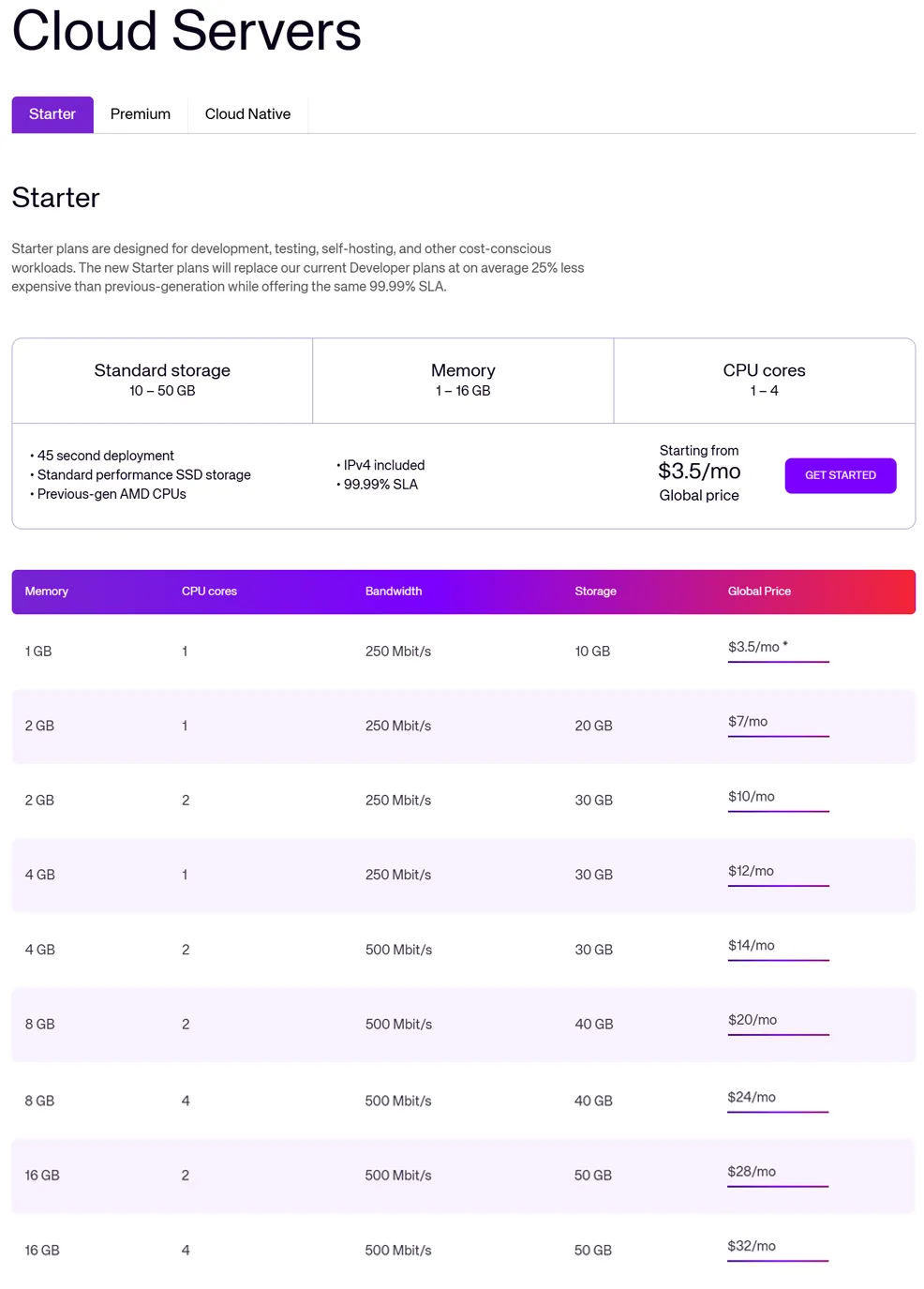
Starter plans are UpCloud’s budget VPS tier. They are the most relevant option for small self-hosted projects, test servers, development environments, personal websites, lightweight WordPress or Joomla deployments, simple Docker stacks, uptime monitors, and low-traffic applications.
The entry Starter plan costs $3.50/month and includes 1 GB RAM, 1 vCPU, 10 GB Standard storage, 250 Mbit/s bandwidth, and a public IPv4 address. Higher Starter plans scale up to 16 GB RAM and 4 vCPU with larger Standard storage allocations. The main appeal is simple: Starter is inexpensive, globally priced, and much easier to budget than usage-heavy hyperscaler compute.
The tradeoff is that Starter uses Standard storage and has a lower SLA than Premium. That does not make it bad; it just means it is best viewed as a development, testing, self-hosting, or budget hosting tier. If you are running a revenue-producing website, busy WooCommerce store, client project, or business-critical app, Premium is the safer default.
Premium Cloud Servers
Premium is UpCloud’s primary production VPS tier. Premium plans start at $6/month for 1 GB RAM, 1 vCPU, and 25 GB MaxIOPS storage. The next common steps include $12/month for 2 GB RAM and 1 vCPU, $18/month for 2 GB RAM and 2 vCPU, $26/month for 4 GB RAM and 2 vCPU, $42/month for 8 GB RAM and 2 vCPU, and $54/month for 8 GB RAM and 4 vCPU.
Premium plans include MaxIOPS storage, 1 Gbps networking, a public IPv4 address, and a 99.999% uptime SLA. For most production hosting use cases, this is the plan family we would evaluate first. It is not the cheapest raw VPS pricing on the market, but it is competitive when you account for included high-performance storage, predictable pricing, and the zero-cost egress model.
For a small production WordPress, Joomla, Laravel, Node, or Python app, the $18/month or $26/month Premium plans are likely more realistic starting points than the smallest 1 GB plan. The smallest plans are useful, but modern CMS hosting often benefits from more memory and CPU headroom, especially when you add PHP workers, a database, caching, security tools, backups, and traffic spikes.
Cloud Native Cloud Servers
Cloud Native plans are more modular. They start at 4 GB RAM and 1 vCPU for $14/month for compute, but storage and some other resources are treated separately. The key advantage is billing behavior: Cloud Native compute is only billed while the server is powered on, unlike Starter and Premium servers, which continue billing even when shut down.
This makes Cloud Native attractive for temporary workloads, build servers, test environments, CI/CD tasks, demos, short-lived development environments, and workloads that do not need to run 24/7. It is also useful when you want to attach exactly the storage type and amount you need rather than buying a fixed bundle.
The downside is complexity. Cloud Native is less beginner-friendly because the final monthly cost depends on compute, storage, IP addresses, backups, and other resources. If you simply want a predictable always-on VPS, Starter or Premium will usually be easier to understand.
Storage, Backups, and Object Storage
UpCloud offers multiple storage options. Premium servers include MaxIOPS storage, while Starter plans include Standard storage. Additional block storage can be added, with MaxIOPS, Standard, Archive, and custom image storage priced by allocated GB. UpCloud also offers Simple Backups and on-demand backup options for block storage.
Object Storage starts at $5/month for 250 GB and uses an S3-compatible model. This is useful for static websites, backups, media files, application assets, archives, log storage, and static-site hosting. It is not the same as shared web hosting or dynamic PHP hosting, but it can be a smart option for static HTML/CSS/JS sites or asset-heavy applications.
Bandwidth and Egress Value
UpCloud’s egress model is one of its biggest differentiators. Instead of charging traditional outbound transfer overage fees, UpCloud includes outbound traffic at zero cost under its Fair Transfer Policy. If usage exceeds the fair monthly share, UpCloud says it may notify the user and reduce Cloud Server bandwidth to 100 Mbps for the rest of the month rather than surprise-billing the account for overages.
This is a meaningful advantage compared with providers where bandwidth overages can become expensive or unpredictable. It is especially relevant for websites, APIs, software downloads, self-hosted services, backups, monitoring dashboards, static assets, and modest media delivery. However, it does not mean UpCloud is an unlimited CDN replacement. High-bandwidth users should read the Fair Transfer Policy carefully and consider whether a CDN, object storage strategy, or dedicated transfer plan is more appropriate.
Free Trial and Free Tier
UpCloud does not have an Always Free VPS tier comparable to Oracle Cloud Always Free. Instead, new users may see limited free trials or trial credits, depending on the current promotion and account eligibility. This distinction matters: UpCloud is a paid cloud/VPS provider with trial access, not a permanent free-server platform.
That makes UpCloud less attractive for users who are specifically chasing free homelab infrastructure. But it may be more attractive for users who want a straightforward paid VPS with transparent pricing, better support expectations, and fewer free-tier capacity headaches.
Value Assessment
UpCloud’s value is strongest when you care about predictable VPS pricing, fast storage, included outbound transfer under fair-use rules, and a cleaner developer experience than the major hyperscalers. It is not the lowest-cost provider if you only compare RAM and storage per dollar. Hetzner, Netcup, Contabo, and other budget hosts often look cheaper on raw specs.
However, raw specs are not the whole story. UpCloud becomes more compelling when you factor in storage performance, SLA positioning, European cloud operations, global pricing consistency, customer support reputation, and the reduction of classic egress-fee anxiety. For serious self-managed hosting, agencies, small SaaS teams, and technical website owners, it can be a very reasonable middle ground between bargain VPS hosting and hyperscaler cloud complexity.
| Plan / Resource Type | Typical Pricing Model | Key Resources | Best For |
|---|---|---|---|
| Starter 1 GB | $3.50/month, hourly billing with monthly cap | 1 GB RAM, 1 vCPU, 10 GB Standard storage, 250 Mbit/s bandwidth, public IPv4 included | Small self-hosted tools, development servers, test environments, lightweight websites |
| Starter 2-8 GB | Common plans from $7/month to $24/month | More memory and CPU with Standard storage and predictable fixed pricing | Small WordPress/Joomla sites, staging, Docker apps, homelab services, budget VPS projects |
| Premium 1-4 GB | Common plans from $6/month to $26/month | MaxIOPS storage, 1 Gbps network, public IPv4, stronger SLA coverage | Production websites, small business apps, CMS hosting, APIs, developer projects |
| Premium 8 GB+ | Common plans from $42/month and up | More CPU, RAM, and MaxIOPS storage for heavier workloads | Busy websites, databases, SaaS apps, agency hosting, high-traffic services |
| Cloud Native | Compute from $14/month, with storage and resources billed separately | Compute-only pricing while powered on, modular storage choices, flexible infrastructure | Temporary workloads, CI/build servers, demos, flexible environments, non-24/7 workloads |
| Object Storage | Starts at $5/month for 250 GB | S3-compatible storage, automatic scaling, zero-cost egress under fair-use rules | Static websites, backups, media, software assets, archives, application storage |
Pricing note: UpCloud is simpler than AWS-style infrastructure pricing, but it is still cloud hosting. Users should review server plan, storage, backups, extra IPv4 addresses, managed databases, load balancers, NAT/VPN gateways, and other add-ons before assuming a deployment will stay at the advertised base VPS price.
Ready to try UpCloud?
UpCloud is a strong option for technical users who want predictable cloud VPS pricing, fast storage, and zero-cost outbound transfer under fair-use rules. Review the latest pricing directly on UpCloud’s site before choosing a plan for production workloads.
Performance and Speed
UpCloud has built much of its reputation around performance. The company has long emphasized fast storage, quick provisioning, and high-quality VPS infrastructure. Its Premium plans use MaxIOPS storage, while Starter plans provide a lower-cost path with Standard storage. This lets users choose between budget-friendly hosting and higher-performance production infrastructure.
For typical VPS hosting, UpCloud should feel fast when configured properly. A well-tuned WordPress or Joomla site on an appropriately sized Premium server can be dramatically faster and more flexible than shared hosting. You can choose the web server, PHP version, caching layer, database configuration, security tools, deployment workflow, and backup strategy. That level of control is a major reason developers prefer VPS hosting over shared hosting.
The caveat is that UpCloud provides infrastructure, not automatic optimization. A poorly configured VPS can still be slow. If you install a bloated WordPress stack, skip page caching, run the database on an undersized 1 GB server, misconfigure PHP workers, or ignore image optimization, UpCloud will not magically fix those application-level bottlenecks.
Independent benchmark data generally suggests that UpCloud is competitive, though not always the absolute value leader in every plan size or workload. Some benchmark results show strong web or stability performance on certain plans, while disk and network grades vary by plan and test. That is normal for VPS comparisons: performance depends heavily on server tier, region, storage type, neighbor load, application stack, and testing methodology.
User sentiment around performance is generally positive. Review-platform users often praise speed, reliability, and support, while Reddit users tend to describe UpCloud as a quality provider that performs well but may cost more than raw-spec budget competitors. The most common performance-related criticism is not that UpCloud is slow; it is that users comparing providers should not assume every UpCloud plan will beat every Hetzner, Vultr, Linode, or DigitalOcean plan in every benchmark.
Ease of Use and Setup
UpCloud is easier to understand than AWS EC2, Google Compute Engine, Azure Virtual Machines, or Oracle Cloud Infrastructure, but it is still not beginner shared hosting. The control panel is designed for people who know what a server is and are comfortable making choices about regions, operating systems, SSH keys, firewalls, storage, backups, and networking.
Creating a basic server is straightforward. You choose a data center, select a plan, pick an operating system image, add SSH keys or credentials, and deploy. From there, the experience becomes self-managed. You still need to install Nginx or Apache, PHP, MariaDB or MySQL, Node.js, Docker, a firewall, SSL certificates, monitoring, and backups depending on your use case.
For developers, this is a reasonable workflow. UpCloud gives you root access and a clean environment, and you can automate deployments using the API, CLI, Terraform, Ansible, cloud-init, or your own scripts. For a nontechnical user trying to launch their first website, this may be too much work.
One practical solution is to use a server control panel on top of UpCloud. Tools like RunCloud, Ploi, CloudPanel, CyberPanel, SpinupWP, GridPane, or a manually installed cPanel/WHM license can make UpCloud feel more like managed web hosting. That adds cost and another layer to manage, but it can be an excellent compromise for agencies and site owners who want VPS performance without doing everything by hand.
The most important ease-of-use distinction is this: UpCloud is simple for a cloud VPS provider, but not simple like Bluehost, Hostinger, SiteGround, or a managed WordPress host. It is best for people who want infrastructure control and are willing to manage the server stack.
Developer and Advanced Features
Developer flexibility is one of UpCloud’s strongest areas. Cloud Servers provide root access, Linux and Windows options, custom server configurations, fast deployment, snapshots/backups, private networking, floating IPs, firewalls, APIs, CLI tooling, Terraform support, managed databases, managed Kubernetes, object storage, load balancers, NAT gateways, VPN gateways, and private cloud options.
That makes UpCloud much more capable than a basic VPS host. A developer can build a simple single-server website, a multi-server application, a private network, a load-balanced architecture, a managed database backend, an object-storage-backed app, or a Kubernetes cluster. The platform is not as broad as AWS or Google Cloud, but it covers the infrastructure needs of many small businesses, agencies, SaaS teams, and technical website owners.
UpCloud is also useful for self-hosting. Common use cases include Docker Compose stacks, reverse proxies, private dashboards, monitoring tools, Git repositories, small game servers, static sites, VPN endpoints, automation tools, web apps, and development environments. Starter plans make those projects inexpensive, while Premium plans offer a better fit for production workloads.
Managed databases are another useful feature. UpCloud offers managed MySQL, PostgreSQL, Valkey, and OpenSearch options. These services can reduce operational burden compared with running every database on the same VPS, though they add cost. For small hobby sites, a database on the same server may be enough. For production apps, separating the database can improve reliability and maintenance.
Overall, UpCloud is strongly developer-friendly. It is not trying to be a one-click beginner web host; it is trying to be a practical cloud platform for people who want VPS control without the full complexity of a hyperscaler.
Security, SSL, and Backups
UpCloud provides the infrastructure needed to build a secure hosting environment, including private networking, firewalls, floating IPs, backups, managed databases, encryption-oriented services, status monitoring, and account controls. Premium plans also include stronger SLA positioning than Starter plans. However, like all self-managed VPS platforms, security is a shared responsibility.
On a traditional managed host, many server-level tasks are handled for you. On UpCloud, you are responsible for securing the operating system, managing SSH access, configuring firewall rules, installing updates, hardening the web stack, setting up SSL, monitoring logs, protecting admin panels, and ensuring backups actually work.
SSL is not difficult, but it is not usually automatic in the same way it is on beginner shared hosting. You can use Let’s Encrypt, Certbot, a web control panel, a reverse proxy, a load balancer, or another certificate-management workflow. The right approach depends on whether you are running one website, many client sites, containers, or a more complex application.
Backups deserve special attention. UpCloud offers Simple Backups and on-demand backup options, but users need to configure them intentionally. A VPS without backups is not a safe production environment, regardless of provider. For important workloads, we recommend combining provider-level backups with off-provider backups, especially for databases and website files.
UpCloud can be very secure when configured properly. But it is not a “set it and forget it” platform. It is best for users who understand server administration or who are willing to add a management layer that handles updates, backups, SSL, and hardening.
Customer Support
Customer support is one of UpCloud’s stronger reputation areas. Review platforms frequently mention helpful staff, fast replies, good service quality, transparent pricing, and positive support interactions. UpCloud also provides documentation, tutorials, API documentation, a status page, and customer support channels.
That said, expectations matter. UpCloud support can help with platform-level issues, billing, infrastructure questions, and guidance around services. It is not the same as fully managed WordPress support. If your PHP plugin breaks, your Joomla template conflicts with caching, your custom Docker container fails, or your database query is inefficient, you may still need to troubleshoot the application layer yourself or hire a developer.
Reddit sentiment is generally positive but more practical and skeptical than marketing copy. Users often describe UpCloud as reliable, fast, and professionally run, but they also compare it against lower-cost providers and question whether the price premium is justified for every use case. That is a fair critique. UpCloud is not always the cheapest VPS; it is better evaluated as a quality VPS/cloud provider with stronger support and infrastructure positioning than many bargain hosts.
Some negative sentiment centers around billing/resource cleanup, account restrictions, or confusion around what continues billing after a server is shut down. This is not unique to UpCloud, but it is worth noting. Starter and Premium servers bill while shut down, and extra storage, backups, IP addresses, and other resources can continue generating charges until deleted. Users should understand the resource model before experimenting heavily.
Scalability and Flexibility
UpCloud scales much further than a basic VPS provider. A user can start with a $3.50 Starter server, move to larger Starter or Premium plans, add MaxIOPS storage, attach additional block storage, use object storage, deploy managed databases, add load balancers, create private networks, use NAT or VPN gateways, deploy Kubernetes, or move into private cloud infrastructure.
For small websites, that may be more than enough. A single properly sized Premium VPS can run a serious WordPress, Joomla, or application stack if configured well. For more complex projects, the ability to separate the database, add private networking, use object storage, or place load balancers in front of app servers gives UpCloud a real growth path.
UpCloud is not as infinitely broad as AWS, Google Cloud, or Azure. If you need hundreds of managed services, giant marketplaces, niche AI platforms, serverless ecosystems, or deep enterprise integrations, a hyperscaler may be more appropriate. But many hosting users do not need that. They need reliable VPS infrastructure, storage, networking, backups, and a manageable path to scale.
The Cloud Native tier adds flexibility for users who want modular compute and storage. Because compute billing stops when powered off, it can be cost-effective for short-term workloads. That said, users need to watch separately billed storage and resources. For always-on production hosting, Premium remains easier to budget.
Scalability takeaway: UpCloud gives developers and agencies more room to grow than a basic VPS host, without forcing them into the complexity of AWS or Google Cloud. It is strongest for practical cloud hosting, not massive hyperscaler-style architectures.
Data Centers and Global Reach
UpCloud operates a global data center footprint with locations across Europe, the United States, Asia-Pacific, and Australia. Current locations include cities such as Amsterdam, Copenhagen, Frankfurt, Helsinki, London, Madrid, Stavanger, Stockholm, Warsaw, Chicago, New York, San Jose, Singapore, and Sydney.
The European footprint is especially important to UpCloud’s identity. The company emphasizes European operations, Nordic expansion, data sovereignty, compliance, and an alternative to large US-based hyperscalers. For organizations that care about hosting in Europe, Nordic coverage, GDPR-conscious infrastructure, or avoiding dependence on Big Tech cloud platforms, UpCloud is worth a closer look.
For ordinary website owners, region choice should be based on audience location. A US-focused site may choose New York, Chicago, or San Jose. A UK or Western European site may choose London, Amsterdam, Frankfurt, or Madrid. A Nordic audience may benefit from Helsinki, Stockholm, Copenhagen, or Stavanger. Asia-Pacific workloads may consider Singapore or Sydney.
UpCloud does not have as many regions as AWS, Google Cloud, Azure, or Oracle Cloud. But it has more than enough coverage for many websites, apps, agencies, and SaaS projects. The bigger question is whether the specific services and plan types you want are available in the location that best matches your users.
Who Is UpCloud Best For?
Best For
- Developers who want fast, predictable cloud VPS hosting
- Agencies that manage client websites on self-managed or panel-managed VPS infrastructure
- Technical WordPress, Joomla, Laravel, Node, Python, and Docker users
- Startups and SaaS builders that want simpler cloud infrastructure than AWS or Google Cloud
- Users who care about European cloud operations, Nordic hosting options, or data-sovereignty positioning
- Self-hosters who want quality infrastructure but do not need a permanent free tier
- Businesses that want lower egress-fee anxiety than traditional hyperscaler cloud pricing
- Production workloads that benefit from Premium plans, MaxIOPS storage, and strong SLA coverage
Not Ideal For
- Beginners who want cPanel, bundled email, and one-click managed WordPress
- Users looking for a permanent Always Free VPS tier
- People who do not want to manage Linux, SSH, SSL, firewalls, updates, or backups
- Projects where the cheapest possible RAM/storage per dollar is the only priority
- Users who need the enormous service catalog of AWS, Google Cloud, Azure, or Oracle Cloud
- Nontechnical site owners who expect support to troubleshoot application-level WordPress or Joomla issues
- Heavy media, CDN, or bandwidth-intensive workloads that may exceed fair-transfer assumptions
Ready to try UpCloud?
If you are comfortable with VPS hosting and want a fast, predictable, developer-friendly cloud provider, UpCloud is one of the more polished options available. If you want simple shared hosting or fully managed WordPress, compare it carefully with easier alternatives first.
How We Evaluated UpCloud
For this review, we evaluated UpCloud from the perspective of a hosting buyer rather than an enterprise procurement team. That means we focused most heavily on VPS-style hosting, Cloud Server pricing, included resources, storage quality, outbound transfer policy, ease of deployment, developer flexibility, support reputation, data center coverage, and practical usability for websites and self-hosted applications.
We considered UpCloud’s official pricing, product documentation, Cloud Server plan structure, billing behavior, fair transfer policy, data center list, managed services, public reviews, benchmark discussions, Reddit sentiment, and common user comparisons against DigitalOcean, Vultr, Linode/Akamai, Hetzner, Oracle Cloud, AWS Lightsail, Google Cloud, Scaleway, and other VPS/cloud providers.
Our scoring weighs UpCloud differently from a shared hosting company. We do not penalize it simply for lacking cPanel or bundled email, because UpCloud is not trying to be a consumer shared host. But we do account for the fact that many people searching for “UpCloud hosting” may be trying to host a website and need to understand the difference between self-managed VPS infrastructure and beginner-friendly web hosting.
Scoring Breakdown
| Category | Score |
|---|---|
| Performance | 8.7/10 |
| Ease of Use | 7.8/10 |
| Pricing/Value | 8.6/10 |
| Features | 8.5/10 |
| Security/Backup | 8.3/10 |
| Support | 8.2/10 |
| Scalability | 8.6/10 |
| Overall | 8.4/10 |
Top Alternatives to UpCloud
If UpCloud does not seem like the right fit, you may also want to consider alternatives such as DigitalOcean, Vultr, Linode/Akamai Cloud, Hetzner, AWS Lightsail, Google Cloud, Oracle Cloud, Scaleway, OVHcloud, and managed VPS layers such as Cloudways, RunCloud, or Ploi.
DigitalOcean is usually a better fit for users who want the most polished small-developer cloud experience, excellent tutorials, simple Droplet pricing, managed databases, App Platform, and broad community resources. UpCloud can be competitive on performance and egress, but DigitalOcean is still one of the easiest developer VPS platforms to recommend to beginners with some technical comfort.
Vultr is a strong alternative for users who want many global locations, simple hourly VPS deployment, a wide range of instance types, and a familiar developer-cloud workflow. Vultr may be a better choice if location variety or quick experimentation matters most, while UpCloud may appeal more to users who prioritize European operations and zero-cost egress under fair-use rules.
Linode/Akamai Cloud remains a good choice for developers who want straightforward Linux servers, predictable pricing, and a long-standing VPS-style experience. It has strong documentation and a familiar cloud dashboard, though UpCloud’s pricing structure and transfer model may be more attractive for some workloads.
Hetzner is one of the strongest alternatives for raw price-to-performance, especially for users comfortable with European data centers. Hetzner often beats UpCloud on raw RAM, CPU, or storage per dollar, but UpCloud may feel more polished as a cloud platform and offers a different mix of support, regions, services, and egress policy.
Oracle Cloud is worth considering if you specifically want a generous Always Free tier or very high bandwidth allowances. It can be a remarkable value for technical users, but it is more complex and more enterprise-cloud-like than UpCloud. UpCloud is usually easier to understand as a paid VPS provider.
AWS Lightsail is a useful alternative for users who want a simplified VPS product inside the AWS ecosystem. It is easier than full AWS EC2 and includes predictable bundles, but UpCloud may be simpler for users who do not need AWS integrations and want a more VPS-focused provider.
Google Cloud and AWS EC2 are better choices for users who need the deepest cloud ecosystems, marketplaces, AI services, serverless platforms, and enterprise integrations. They are often more complex and can be more expensive, especially around outbound transfer, but they are hard to beat for large-scale cloud architecture.
Scaleway and OVHcloud are also relevant European alternatives. Scaleway is interesting for developers who want European cloud services and object storage, while OVHcloud is strong for dedicated servers, VPS hosting, and European infrastructure breadth. Both are worth comparing if European hosting is a major priority.
Cloudways and similar tools are not direct infrastructure competitors, but they can make an UpCloud VPS easier to manage. If you like UpCloud’s infrastructure but want a simpler website-management layer, pairing UpCloud with one of these tools may be a better solution than choosing shared hosting.
Final Verdict
UpCloud is a strong cloud VPS provider for developers, agencies, startups, SaaS builders, and technical website owners who want fast infrastructure without hyperscaler complexity. Its current Cloud Server lineup is clearer than before, with Starter plans for budget and development use, Premium plans for production workloads, and Cloud Native plans for more modular or temporary infrastructure.
Its biggest strengths are predictable pricing, quick deployment, MaxIOPS storage on Premium plans, zero-cost outbound transfer under fair-use rules, European cloud positioning, strong support sentiment, and useful cloud features beyond basic VPS hosting. Its biggest weaknesses are the lack of beginner shared hosting, no permanent Always Free VPS tier, higher pricing than some bargain providers, and the need to manage your own server stack.
For hosting a serious website or application, UpCloud is best viewed as a high-quality self-managed VPS/cloud platform. It gives you the building blocks, but you are responsible for configuring the web stack, security, SSL, backups, updates, and application performance. Users who understand that model may find UpCloud fast, clean, and reliable. Users expecting cPanel, built-in email, one-click WordPress support, and hand-holding will likely be happier elsewhere.
Overall, UpCloud earns a strong rating because it occupies a useful middle ground: more professional and cloud-capable than many cheap VPS hosts, simpler than AWS or Google Cloud, and more transparent around bandwidth costs than many cloud providers. It is not the cheapest VPS on the market, but it is one of the more compelling options for developers and businesses that value predictable infrastructure.
Ready to try UpCloud?
If your priority is fast, predictable, self-managed VPS hosting with strong European infrastructure and reduced egress-fee anxiety, UpCloud deserves a close look. If your priority is beginner-friendly managed website hosting, compare alternatives before committing.
Frequently Asked Questions
Is UpCloud good for VPS hosting?
Yes, UpCloud is a strong VPS hosting provider for developers and technical users. It offers root-access cloud servers, predictable pricing, strong storage options, private networking, object storage, managed databases, and useful automation tools. It is best for users who are comfortable managing their own server or using a VPS management panel.
Is UpCloud a shared hosting company?
No. UpCloud is not a traditional shared hosting provider. It does not include cPanel, email hosting, or managed WordPress by default. It provides cloud infrastructure, which means you deploy and manage your own server environment.
Does UpCloud have an Always Free tier?
No, UpCloud does not have a permanent Always Free VPS tier like Oracle Cloud. UpCloud may offer limited free trials or promotional credits for new users, but its core model is paid cloud VPS hosting.
How much does UpCloud cost?
UpCloud Starter Cloud Servers begin at $3.50/month, while Premium Cloud Servers begin at $6/month. Cloud Native compute begins at $14/month before storage and some other resources are added. Object Storage starts at $5/month for 250 GB. Users should also account for backups, extra storage, additional IPs, databases, and other add-ons.
What is the difference between UpCloud Starter and Premium?
Starter plans are lower-cost cloud servers designed for development, testing, self-hosting, and lighter workloads. Premium plans are better for production and business-critical hosting because they include MaxIOPS storage, 1 Gbps networking, and a stronger 99.999% uptime SLA.
What is UpCloud Cloud Native?
Cloud Native is UpCloud’s more modular cloud server option. Compute and storage are separated, and compute charges apply only while the server is powered on. This can be useful for temporary workloads, testing, CI/build servers, and flexible infrastructure, but it is less beginner-friendly than fixed Starter or Premium bundles.
Does UpCloud charge for bandwidth?
UpCloud uses a zero-cost egress model under its Fair Transfer Policy. Outbound traffic is included rather than billed with classic overage fees. If usage exceeds the fair monthly share, UpCloud may reduce bandwidth for the rest of the month rather than surprise-billing the account. Heavy bandwidth users should read the policy carefully.
Can I host WordPress on UpCloud?
Yes, UpCloud can host WordPress very well, but it is self-managed unless you add a control panel or management layer. You will need to install and configure the web server, PHP, database, SSL, caching, backups, updates, and security yourself, or use a tool such as RunCloud, Ploi, CloudPanel, GridPane, SpinupWP, or cPanel.
Does UpCloud include cPanel?
No, UpCloud does not include cPanel by default. You can install cPanel/WHM or another control panel on a compatible server, but licensing, installation, updates, and security are your responsibility.
Is UpCloud better than DigitalOcean?
UpCloud may be better if you care about European cloud positioning, zero-cost egress under fair-use rules, MaxIOPS storage, and a strong VPS performance reputation. DigitalOcean may be better if you want the easiest developer experience, more tutorials, App Platform, and a larger beginner-friendly community. Both are strong options.
Is UpCloud better than Hetzner?
Hetzner often wins on raw price-to-performance, especially for users who want inexpensive European VPS or dedicated servers. UpCloud may be better for users who want a more polished cloud platform, global pricing consistency, more VPS-focused cloud services, stronger support sentiment, and zero-cost egress under fair-use rules. The better choice depends on whether you value lowest raw price or a more rounded cloud experience.
What do Reddit users say about UpCloud?
Reddit sentiment is generally positive but pragmatic. Users often describe UpCloud as fast, reliable, and professionally run, while also noting that it is not always the cheapest option compared with Hetzner, Netcup, Contabo, or other budget providers. Common cautions include watching billing, deleting unused resources, and choosing the right plan tier for the workload.
Is UpCloud safe for production websites?
Yes, UpCloud can be a good production hosting platform, especially on Premium plans. However, users should configure backups, updates, SSL, firewalls, monitoring, and application security properly. A self-managed VPS is only as safe as the way it is configured and maintained.
Who should choose UpCloud?
UpCloud is best for developers, agencies, SaaS builders, self-hosters, and technical website owners who want fast, predictable cloud VPS infrastructure. Beginners who want shared hosting, bundled email, managed WordPress support, or cPanel included by default should consider a more traditional web host.
Editorial note: Cloud plans, pricing, transfer policies, trial credits, support policies, and data center availability can change over time. Before signing up, always confirm the latest details directly on UpCloud’s site.