
Our GoDaddy Hosting Review & Analysis for 2026

 By:
By: Table of Contents
- Quick Facts
- What Is GoDaddy Hosting?
- Plans, Pricing, and Overall Value
- Performance and Speed
- Ease of Use and Setup
- Developer and Advanced Features
- Security, SSL, and Backups
- Customer Support
- Scalability and Flexibility
- Data Centers and Global Reach
- Who Is GoDaddy Best For?
- How We Evaluated GoDaddy
- Scoring Breakdown
- Top Alternatives
- Final Verdict
- Frequently Asked Questions
Pros
- Very easy for beginners to get started, especially if buying a domain and hosting together
- Broad product lineup that includes shared hosting, managed WordPress, VPS, and business tools
- 24/7 support access via phone and chat, which many competing budget hosts do not offer
- Shared hosting includes cPanel, unmetered bandwidth, and daily backups
- Strong fit for small business brochure sites, simple WordPress sites, and first-time website owners
- Well-known brand with a large support ecosystem, documentation library, and integrated services
Cons
- Renewal pricing can be dramatically higher than the promotional price
- Checkout flow and account experience often push upsells, trials, and add-ons
- Overall hosting value is weaker than several alternatives at similar or lower prices
- Economy shared plan is relatively limited and only includes a one-year SSL certificate
- Interface can feel fragmented because account tools, cPanel, and managed WordPress controls live in different places
- Reddit sentiment is often much more negative than mainstream consumer-review sentiment
Ready to try GoDaddy?
If your priority is getting a site online quickly with a familiar brand, phone support, and an all-in-one domain-and-hosting setup, GoDaddy may be worth a closer look. Review the latest plans, features, and pricing directly on the provider’s site before signing up.
Quick Facts
| Provider | GoDaddy |
|---|---|
| Hosting Type | Shared, Managed WordPress, VPS, Fully Managed VPS, Website Builder |
| Starting Price | $5.99/month (shared hosting or WordPress hosting on a 3-year term) |
| Renewal Price | Higher at renewal; varies by plan and can rise significantly after the initial term |
| Billing Style | Monthly and multi-year options, with the best promotional pricing tied to long commitments |
| Storage | 25 GB to 75 GB NVMe on shared plans; lower storage on entry managed WordPress; much more on VPS tiers |
| CPU/RAM | Abstracted on shared plans; dedicated allocations on VPS and fully managed VPS |
| Control Panel | cPanel on shared hosting; custom dashboard on managed WordPress; server controls on VPS |
| Managed Hosting Available | Yes |
| Root Access | Yes, on self-managed VPS plans |
| Data Center Locations | North America and Europe on shared hosting; broader global options on VPS products |
| Uptime SLA | 99.9% |
| Free SSL | Yes, but details vary by plan; Economy shared is more limited than upper tiers |
| Backups | Automatic daily backups on shared hosting; weekly backups on entry managed WordPress; snapshot backups on VPS |
| Support | 24/7 phone and chat support |
| Best For | Beginners, small businesses, domain customers who want bundled hosting, and users who prefer phone support |
Bottom line: GoDaddy makes it easy to bundle domains, hosting, email, and website tools in one place, and that convenience is its biggest strength. The main tradeoff is that its long-term value is not particularly strong once renewals, add-ons, and comparable alternatives are taken into account.
What Is GoDaddy Hosting?
GoDaddy is one of the biggest names in domains and web services, and its hosting portfolio is built around that same mass-market appeal. It offers shared hosting, managed WordPress hosting, VPS hosting, fully managed VPS hosting, domains, email, security tools, and site-building products aimed at users who want a familiar, centralized platform.
Its core appeal is convenience more than cutting-edge hosting. GoDaddy tries to be the place where a customer can register a domain, spin up a website, add email, buy security extras, and get support without leaving the ecosystem. For some users, that simplicity is genuinely useful. For others, especially those who compare specs and renewal pricing closely, that convenience can feel expensive.
Plans, Pricing, and Overall Value
Plan Types
GoDaddy’s lineup covers several different use cases. Shared hosting is its most mainstream option and is aimed at personal websites, blogs, and basic business sites. Managed WordPress hosting is a more specialized environment for WordPress users who want pre-installed WordPress, built-in optimization, and simpler maintenance. Above that, GoDaddy offers self-managed VPS for users who want more control and fully managed VPS for businesses that want stronger resources without handling the underlying server administration themselves.
Entry-Level Pricing
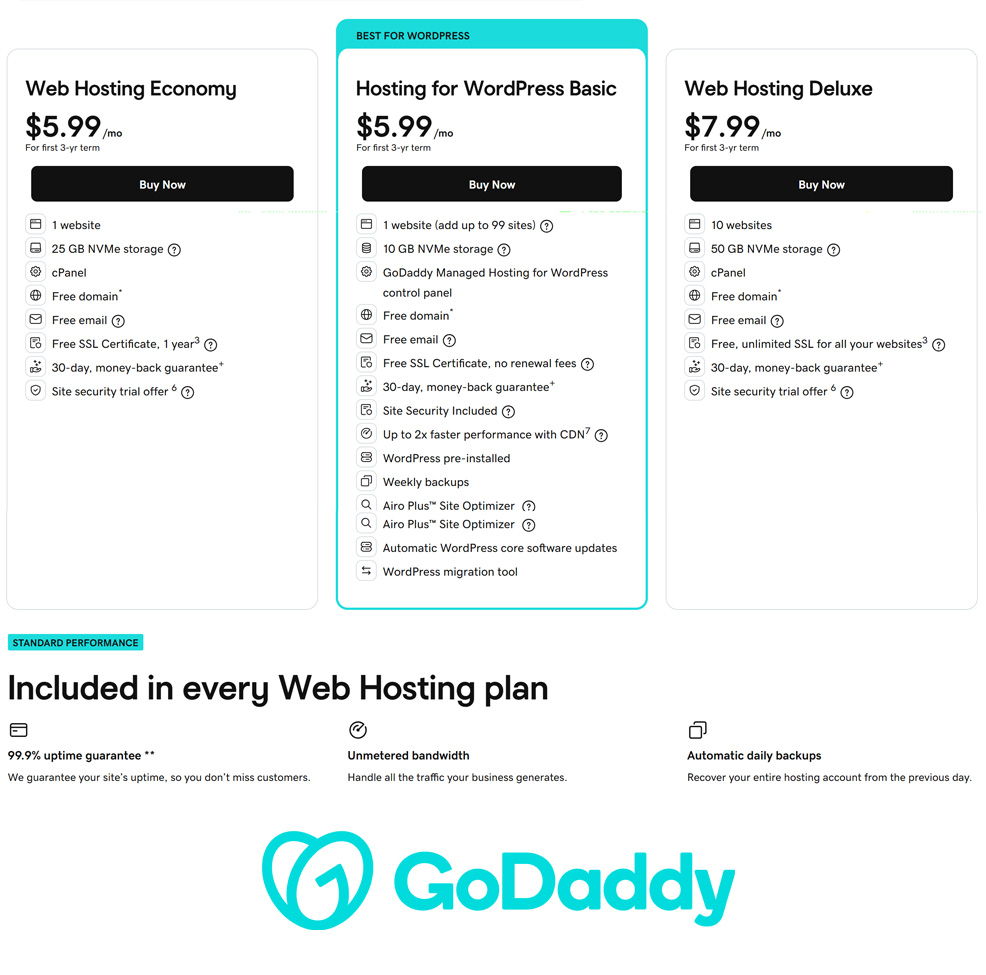
At the time of writing, GoDaddy advertises its Economy shared hosting plan at about $5.99/month for the first 3-year term, with Deluxe at about $7.99/month and Ultimate at about $12.99/month. Its entry managed WordPress plan is also marketed around $5.99/month on a long-term commitment, while fully managed VPS pricing starts much higher and is aimed at a completely different buyer segment.
Renewal Pricing and Hidden Costs
This is where GoDaddy becomes much less attractive. Like many large hosting providers, it relies heavily on introductory pricing. Once the initial term expires, the ongoing cost can jump substantially. Add-on culture also matters here: security, premium support, and other extras are frequently surfaced during checkout or account management. Some inclusions vary by plan as well. For example, shared hosting includes daily backups, but the Economy tier is more limited than the higher tiers, and the SSL story is more generous on Deluxe and Ultimate than on the base shared plan.
Value Assessment
GoDaddy is not a bad value if your top priority is convenience and support availability. It is easy to understand why many beginners choose it. But once price-sensitive shoppers compare long-term costs and included features against rivals, GoDaddy tends to look more average than exceptional. In other words, it sells simplicity and familiarity more than standout hosting value.
| Plan Tier | Starting Price | Key Resources | Best For |
|---|---|---|---|
| Web Hosting Economy | $5.99/mo | 1 website, 25 GB NVMe storage, cPanel, free domain, free email, 1-year SSL, daily backups | Starter sites, simple business pages, first websites |
| Web Hosting Deluxe | $7.99/mo | 10 websites, 50 GB NVMe storage, cPanel, free domain, free email, unlimited SSL, daily backups | Small business sites, multiple small projects, better overall shared value |
| Hosting for WordPress Basic | $5.99/mo | 1 website, 10 GB NVMe storage, WordPress pre-installed, weekly backups, CDN, site security included | Simple WordPress sites for users who want easier management |
Pricing note: GoDaddy’s low headline prices are tied to long-term commitments. Shoppers should always compare the renewal price and any bundled trials or add-ons before deciding.
Ready to try GoDaddy?
If your priority is getting a site online quickly with a familiar brand, phone support, and an all-in-one domain-and-hosting setup, GoDaddy may be worth a closer look. Review the latest plans, features, and pricing directly on the provider’s site before signing up.
Performance and Speed
GoDaddy’s performance is generally best described as good enough for ordinary small-business and personal sites, but not especially compelling as a performance-first host. Its shared hosting uses current NVMe storage and includes unmetered bandwidth, which helps on paper, and its managed WordPress platform adds a CDN and some optimization tools. For many everyday websites, that will be perfectly serviceable.
Where things become less favorable is in the comparison against similarly priced alternatives. GoDaddy’s performance reputation is not terrible, but it also does not stand out as a category leader. Many experienced users see it as a convenience host rather than a speed/value champion. That distinction matters because a beginner may be satisfied with “works fine,” while an agency or optimization-minded site owner may expect more for the money.
For brochure sites, local businesses, basic blogs, and straightforward WordPress installs, GoDaddy should be adequate. For demanding ecommerce, traffic spikes, or performance-sensitive projects, more specialized hosting platforms often make a stronger case.
Ease of Use and Setup
Ease of use is one of GoDaddy’s biggest advantages. The brand has spent years tailoring its platform to non-technical customers, and that shows in the onboarding flow, the product packaging, and the way it encourages users to buy everything they need in one place. Registering a domain, buying hosting, launching WordPress, and attaching email can be done quickly without much technical knowledge.
That said, the experience is not always as clean as it first appears. GoDaddy’s ecosystem is broad, and that can create a somewhat fragmented interface. A user may find themselves moving between account pages, cPanel, hosting dashboards, WordPress-specific controls, and upsell screens. It is still beginner-friendly overall, but not always as streamlined as the marketing suggests.
In practical terms, GoDaddy is easy to start with and occasionally a bit cluttered to live in. Beginners may not mind that tradeoff, while more experienced users may find it inefficient compared with cleaner platforms.
Developer and Advanced Features
GoDaddy is not primarily a developer-first hosting company, but it does offer more than just basic shared hosting. Shared plans include cPanel, which many users still prefer because it is familiar and widely documented. Those who need more control can move into VPS environments, where they get dedicated resources, operating system choices, and a more customizable server setup.
Its VPS lineup is broad enough for many small-to-midsize technical projects, and the fully managed VPS tier is clearly aimed at businesses that want the resources of a VPS without taking on the operational burden. That gives GoDaddy some flexibility beyond the starter market. Still, highly technical users may find better value and better tooling from providers that focus more directly on developer workflows, cloud infrastructure, or performance tuning.
In short, GoDaddy covers the basics and then some, but it is still best thought of as a mainstream hosting platform rather than a power-user favorite.
Security, SSL, and Backups
GoDaddy’s baseline security story is decent, but it comes with caveats. Shared hosting includes daily backups, which is a meaningful plus. Managed WordPress includes site security and SSL without renewal fees on the base plan, while shared hosting tiers differ in how generous they are with SSL. The Economy shared plan is notably more limited than Deluxe and Ultimate, both of which include broader SSL coverage.
Security is also an area where GoDaddy tends to mix useful built-in protections with upsell pressure. Shoppers will often encounter references to enhanced security trials, premium monitoring, and add-on protection products. That does not make the core hosting insecure, but it does mean users should read carefully so they understand what is included versus what is merely being promoted during signup.
For most small websites, the built-in basics should be acceptable. But as always, businesses should still maintain their own update discipline, strong passwords, and external backup strategy if the site is important.
Customer Support
Support is one of GoDaddy’s stronger selling points, at least on paper. It offers 24/7 support access via phone and chat, and that alone will make it more attractive to some buyers than budget hosts that rely only on chat or tickets. For beginners who feel more comfortable speaking with a real person, this is a legitimate advantage.
The catch is that support sentiment is mixed. Many mainstream consumers appreciate the accessibility and breadth of support channels, but more experienced users often describe the support experience as uneven, sales-heavy, or less helpful on more technical issues. This split is one reason GoDaddy’s broader reputation feels so polarized depending on who you ask.
Overall, GoDaddy deserves credit for accessible support, especially for non-technical customers. It just does not always deliver the kind of expert, high-touch hosting support that advanced users expect.
Scalability and Flexibility
GoDaddy offers a clearer growth path than some entry-level hosts. A new site can start on shared hosting, move into managed WordPress if that better fits the workflow, and eventually scale into VPS or fully managed VPS. That product ladder is useful, particularly for small businesses that expect to grow but do not yet need advanced infrastructure.
Still, GoDaddy’s scalability is practical rather than especially elegant. The product categories are there, but the experience of moving upmarket does not feel as streamlined or developer-centric as it does with some competitors. Businesses that plan to grow significantly may outgrow GoDaddy’s value proposition before they outgrow its raw product offerings.
Scalability takeaway: GoDaddy can grow with a small site into more serious hosting tiers, but it is usually a better fit for steady, mainstream growth than for highly technical or aggressively optimized scaling paths.
Data Centers and Global Reach
On its shared hosting pages, GoDaddy highlights data centers in North America and Europe. Its VPS products describe broader global reach and testing environments, which makes sense because VPS customers are more likely to care about region selection and custom deployment. That means GoDaddy has some geographic flexibility, but the exact location options depend on the hosting product you choose.
For many US- and Europe-focused small websites, this will be sufficient. For businesses targeting very specific regions or trying to fine-tune latency globally, it is worth checking the available data center choices for the exact plan type before purchasing.
Who Is GoDaddy Best For?
Best For
- Beginners launching a first website
- Small businesses that want domains, hosting, and email in one account
- Users who prefer phone support in addition to chat
- Customers who care more about convenience and brand familiarity than absolute value
- Simple WordPress sites and standard business brochure websites
Not Ideal For
- Price-sensitive shoppers focused on long-term renewal costs
- Users who dislike aggressive upsells and trial-based add-ons
- Developers seeking a more technical or cloud-native platform
- Performance-focused site owners comparing value across multiple hosts
Ready to try GoDaddy?
If your priority is getting a site online quickly with a familiar brand, phone support, and an all-in-one domain-and-hosting setup, GoDaddy may be worth a closer look. Review the latest plans, features, and pricing directly on the provider’s site before signing up.
How We Evaluated GoDaddy
For this review, we considered GoDaddy’s plan structure, introductory and renewal pricing, included resources, hosting architecture, ease of use, support access, developer flexibility, security posture, backup policies, upgrade path, and overall value for the types of users most likely to consider the platform.
We also weighed broader reviewer sentiment and user-review patterns to identify where GoDaddy appears strongest in practice, and where common frustrations tend to cluster, including renewals, upsells, interface complexity, and the perception that better hosting value can be found elsewhere.
Scoring Breakdown
| Category | Score |
|---|---|
| Performance | 7.6/10 |
| Ease of Use | 8.5/10 |
| Pricing/Value | 6.9/10 |
| Features | 7.8/10 |
| Security/Backup | 7.9/10 |
| Support | 8.3/10 |
| Scalability | 7.7/10 |
| Overall | 7.8/10 |
Top Alternatives to GoDaddy
If GoDaddy does not seem like the right fit, readers may also want to consider alternatives such as Hostinger, SiteGround, and HostGator. Hostinger is often a better fit for users who want stronger entry-level value and a cleaner low-cost hosting experience, SiteGround can be appealing for users who want a more premium managed feel, and HostGator is attractive for users who want more cloud flexibility without managing everything themselves.
Final Verdict
GoDaddy is a reasonable hosting choice for beginners, small businesses, and users who want the convenience of bundling domains, hosting, and related services with a familiar provider.
Its biggest strengths are accessibility, broad product coverage, and easy onboarding, especially for people who are launching their first website or want phone support available around the clock. Its biggest weaknesses are weaker long-term value, aggressive upsell culture, and the reality that many experienced users simply do not see it as one of the better hosting deals on the market.
For some readers, especially non-technical users who want simplicity and brand familiarity, that tradeoff will be acceptable. But for anyone comparing hosting on pure performance-per-dollar or feature-per-dollar terms, GoDaddy is usually a platform worth comparing carefully against alternatives before committing.
Ready to try GoDaddy?
If your priority is getting a site online quickly with a familiar brand, phone support, and an all-in-one domain-and-hosting setup, GoDaddy may be worth a closer look. Review the latest plans, features, and pricing directly on the provider’s site before signing up.
Frequently Asked Questions
Is GoDaddy good for beginners?
Yes. GoDaddy is one of the easier mainstream hosting providers for beginners because it combines domain registration, hosting, email, and support in one familiar ecosystem.
Does GoDaddy offer VPS or managed hosting?
Yes. In addition to shared hosting, GoDaddy offers managed WordPress hosting, self-managed VPS, and fully managed VPS hosting.
Is GoDaddy expensive?
It can be. The entry pricing is competitive enough, but the bigger concern is that renewal rates and add-ons can make the long-term cost noticeably less attractive.
Does GoDaddy include SSL and backups?
Yes, but the details depend on the plan. Shared hosting includes backups and SSL, though the base shared tier is more limited than the upper tiers. Managed WordPress plans are generally more generous with ongoing SSL and built-in security.
Who should choose GoDaddy over competitors?
GoDaddy makes the most sense for users who want convenience, phone support, and a single provider for domains, hosting, and related business tools. It makes less sense for shoppers who care most about long-term value or top-tier hosting performance.
Editorial note: Hosting plans, pricing, features, and policies can change over time. Before signing up, always confirm the latest details directly on the provider’s site.