
Our Kinsta Review & Analysis for 2026

 By:
Table of Contents
- Quick Facts
- What Is Kinsta?
- Plans, Pricing, and Overall Value
- Performance and Speed
- Ease of Use and Setup
- Developer and Advanced Features
- Security, SSL, and Backups
- Customer Support
- Scalability and Flexibility
- Data Centers and Global Reach
- Who Is Kinsta Best For?
- How We Evaluated Kinsta
- Scoring Breakdown
- Top Alternatives
- Final Verdict
- Frequently Asked Questions
Pros
- Excellent managed WordPress performance with isolated container architecture
- Strong built-in security stack with managed WAF, DDoS protection, SSL, and malware cleanup
- Polished MyKinsta dashboard with a very good user experience
- Free unlimited expert migrations and one-click staging on all plans
- Useful developer and agency tools, including API access, cloning, and multisite support
- Very strong user sentiment on major review platforms, especially around support quality
Cons
- Meaningfully more expensive than budget or midrange shared hosting
- No phone support, with assistance handled through chat in MyKinsta
- No bundled email hosting
- Visit-based pricing and overage logic can be frustrating for some users
- Several advanced capabilities require paid add-ons, which can raise the real cost quickly
Ready to try Kinsta?
If your priority is premium managed WordPress hosting with high-end infrastructure, built-in security, and a smooth dashboard experience, Kinsta may be worth a closer look. Review the latest plans, features, and pricing directly on the provider’s site before signing up.
Quick Facts
| Provider | Kinsta |
|---|---|
| Hosting Type | Managed WordPress, Application Hosting, Database Hosting, Static Site Hosting |
| Starting Price | $30/month on annual billing or $35/month monthly for entry WordPress hosting |
| Renewal Price | No steep teaser-to-renewal jump in the traditional budget-hosting sense, but pricing remains premium throughout |
| Billing Style | Monthly or annual billing, with annual plans giving two months free |
| Storage | Starts at 10 GB on entry plans, with larger allocations on higher tiers and add-on expansion options |
| CPU/RAM | Standard live site containers get access to 12 CPUs and 8 GB RAM by default; staging gets 1 CPU and 8 GB RAM |
| Control Panel | Custom MyKinsta dashboard |
| Managed Hosting Available | Yes |
| Root Access | No root access for managed WordPress hosting |
| Data Center Locations | 27 global data center locations |
| Uptime SLA | 99.9% standard, with up to 99.99% on enterprise agreements |
| Free SSL | Yes, including wildcard SSL support |
| Backups | Automatic daily backups included; extra backup frequency and external backups available as add-ons |
| Support | 24/7 chat-based expert support in MyKinsta; no phone support |
| Best For | Businesses, agencies, WooCommerce stores, publishers, and WordPress users who value performance and management over low pricing |
Bottom line: Kinsta stands out as one of the better premium managed WordPress hosts for users who want speed, security, and a polished operational experience without managing infrastructure themselves. The tradeoff is simple: it delivers a lot, but it costs materially more than mainstream shared hosting and can become even more expensive once add-ons or overages enter the picture.
What Is Kinsta?
Kinsta is a managed hosting company centered primarily on WordPress, though it also offers hosting for web applications, databases, and static sites. Its main appeal is that it removes much of the low-level hosting work from the customer while still giving businesses and professional site owners a high-performance environment that feels more modern than legacy cPanel-based hosting.
Rather than positioning itself as a low-cost host for hobby sites, Kinsta is designed for customers who care about infrastructure quality, workflow efficiency, and strong support. The company’s platform runs each WordPress site inside its own isolated software container, which helps separate workloads and contributes to both security and performance consistency.
Plans, Pricing, and Overall Value
Plan Types
Kinsta’s core product is managed WordPress hosting, and that is still the main reason most buyers consider the platform. Within that lineup, the company offers single-site plans, multi-site business plans, agency plans built for client work, and enterprise options for organizations that need custom agreements, stronger compliance support, and higher uptime commitments. Beyond WordPress, Kinsta also offers application hosting, managed databases, and static site hosting, which broadens its appeal for teams that want to keep more of their stack inside one vendor.
Entry-Level Pricing
Kinsta is not a bargain host, and it does not try to be one. Entry WordPress hosting starts at about $35/month when billed monthly, with annual billing effectively lowering the monthly equivalent to about $30/month because annual plans include two months free. That puts Kinsta far above the pricing most people associate with entry shared hosting, but it also comes with a very different product philosophy focused on managed performance, support, and built-in tooling.
Renewal Pricing and Hidden Costs
Kinsta is more straightforward than many discount hosts because it is not built around a dramatic teaser rate followed by a sharp renewal shock. Even so, shoppers still need to pay close attention to the real cost. The platform uses visit-based plan limits, and it applies overage fees when you exceed your allowances. It also sells a number of optional extras, such as Redis caching, reverse proxy support, premium staging environments, external backups, extra disk space, and automatic update tooling, which can materially raise the monthly bill for advanced users.
Another important detail is how Kinsta defines a visit. The company counts each unique IP that visits your site within a 24-hour period as one visit. That can differ meaningfully from what site owners see in analytics platforms, and it is one of the most common pricing-related complaints from experienced users who feel their effective usage ceiling is lower than expected.
Value Assessment
Kinsta offers strong value for buyers who care about managed WordPress quality more than the lowest monthly rate. You get a very polished dashboard, built-in security features, unlimited expert migrations, daily backups, staging, and a more premium support posture than many lower-cost hosts. For smaller projects with limited budgets, the value case is harder to justify, but for agencies, growing businesses, and revenue-generating sites, Kinsta’s higher price can make sense if the operational convenience and performance gains matter enough.
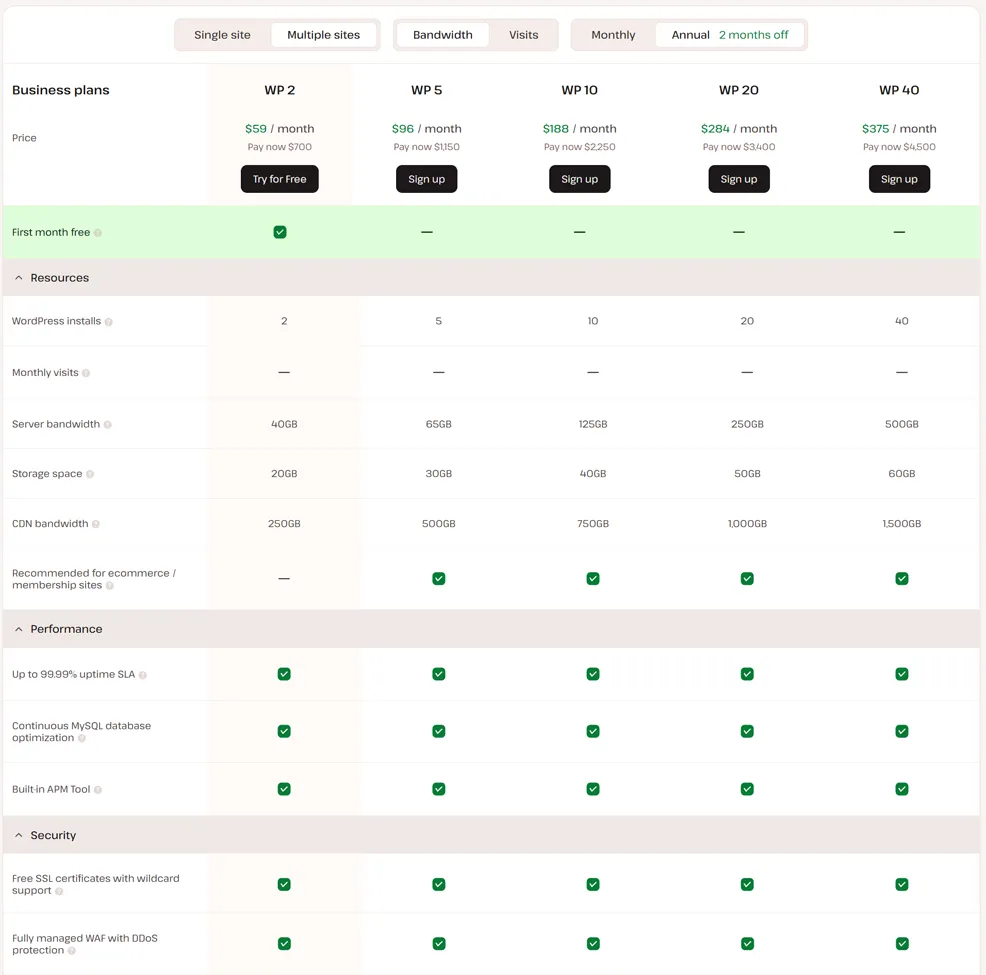
| Plan Tier | Starting Price | Key Resources | Best For |
|---|---|---|---|
| Single 35k | $35/mo monthly or about $30/mo annually | 1 WordPress site, 35,000 monthly visits, 10 GB storage, CDN, daily backups, staging, free migrations | Professional blogs, business sites, premium personal projects |
| WP 2 | $70/mo | 2 WordPress sites, 70,000 monthly visits, 20 GB storage, same managed platform features | Small businesses with multiple sites or one main site plus a secondary property |
| WP 10 | $225/mo | 10 WordPress sites, 250,000 monthly visits, 50 GB storage, stronger room for portfolio growth | Agencies, publishers, and higher-traffic business use |
| Enterprise | Starting at $500/mo | Custom installs, custom traffic allowances, dedicated resources, stronger SLA and compliance options | Larger organizations and mission-critical WordPress deployments |
Pricing note: Kinsta’s costs are easier to understand than many discount hosts, but the real-world total can still climb if you exceed traffic limits or need premium add-ons such as Redis, reverse proxy, or extra backup options.
Ready to try Kinsta?
If your priority is premium managed WordPress hosting with high-end infrastructure, built-in security, and a smooth dashboard experience, Kinsta may be worth a closer look. Review the latest plans, features, and pricing directly on the provider’s site before signing up.
Performance and Speed
Performance is one of Kinsta’s strongest selling points, and this is the area where the platform most clearly separates itself from mass-market shared hosting. Each site runs inside its own isolated container, and standard live environments get access to 12 CPUs and 8 GB of RAM by default. Kinsta also combines its core hosting layer with integrated CDN delivery, edge protections, and a stack designed specifically around managed WordPress performance.
In practical terms, Kinsta is usually a very strong fit for business websites, content-heavy WordPress sites, agency client builds, and many WooCommerce stores that want a managed environment. It is not magic, and highly dynamic sites can still run into resource constraints, especially around PHP workers or traffic allowances, but for many users it will feel much faster and more stable than conventional shared hosting.
One reason Kinsta tends to benchmark well is that it focuses on the things that affect consistency, not just headline speed claims. The company includes features such as server-side caching, CDN delivery, uptime monitoring, and a built-in APM tool on higher-value managed plans, which collectively make it easier to identify and reduce bottlenecks before they become business problems.
Ease of Use and Setup
Kinsta is one of the easier premium hosts to use. Instead of relying on cPanel, it uses its own MyKinsta dashboard, which is modern, well organized, and noticeably less cluttered than many traditional hosting interfaces. Users can manage domains, staging, backups, redirects, analytics, CDN, support conversations, and environment settings from a single control surface that feels designed for current workflows rather than inherited from an older era.
Initial setup is also relatively smooth. Kinsta includes free migrations handled by its team, so many customers can move from another host without having to manage the technical work themselves. That is particularly helpful for businesses or agencies that want to reduce migration risk and get onto the platform quickly.
The main caveat is that Kinsta is still a managed WordPress-focused platform rather than a general anything-goes hosting environment. That helps keep the experience clean, but it also means users looking for total server freedom or broad legacy hosting compatibility may find it more restrictive than a VPS or unmanaged cloud server.
Developer and Advanced Features
Kinsta does more for technical users than many premium managed hosts aimed primarily at beginners. The platform includes SSH access, WP-CLI, staging environments, site cloning, multisite support, and an API that is especially useful for agencies or teams managing multiple WordPress properties. For organizations with repeatable deployment and maintenance workflows, those tools can save meaningful time.
At the same time, Kinsta is still a managed platform first. That means some flexibility is intentionally limited in exchange for platform stability, security, and supportability. This is often the right tradeoff for businesses, but developers who want unrestricted server-level control may prefer a VPS, cloud VM, or more infrastructure-centric provider.
Kinsta also extends beyond WordPress with application hosting, static site hosting, and managed databases, which makes it more interesting than a narrowly defined WordPress-only company. For some teams, that creates a cleaner operational story where marketing sites, web apps, and related services can live under a unified hosting vendor.
Security, SSL, and Backups
Security is another area where Kinsta is clearly stronger than most low-cost hosts. The company routes traffic through Cloudflare and provides a fully managed web application firewall, Layer 3, 4, and 7 DDoS protection, brute-force mitigation, free SSL certificates with wildcard support, and free malware removal. Enterprise customers also gain access to stronger information security assurances, including SOC 2 Type II and ISO 27001 references as part of the broader enterprise security posture.
Kinsta’s architecture helps here too. Because each site runs in its own isolated container, workloads are separated at the software level rather than being packed together into a traditional shared hosting environment. That is valuable from both a performance and containment standpoint.
Backups are included by default, with automatic daily backups across plans and optional upgrades for more frequent backups or external backup destinations. For many business users, that baseline backup coverage will be sufficient, though mission-critical sites should still follow good operational practice and maintain a broader disaster recovery strategy rather than relying on a single provider alone.
Customer Support
Support is one of the reasons Kinsta maintains such strong overall sentiment. The company offers 24/7 support through chat inside MyKinsta, and it positions that support as engineer-led rather than outsourced script-reading help. Many customers consistently praise the responsiveness and technical competence of the support team, especially in comparison with lower-cost hosts where support quality is often one of the biggest weaknesses.
The main limitation is that Kinsta does not offer phone support. The company explicitly prefers chat-based support, arguing that it is faster and more efficient for technical troubleshooting. Some buyers will appreciate that, but others still prefer the reassurance of being able to call someone during a stressful outage or migration issue.
Overall, support is one of Kinsta’s competitive strengths, but it is best understood as premium digital support rather than concierge-style support across every possible channel.
Scalability and Flexibility
Kinsta offers a much clearer scaling path than entry-level shared hosting. Customers can move from a small single-site plan into larger business, agency, or enterprise tiers without changing platforms, and the company allows plan changes with prorated billing. That makes it practical for sites that are growing from a single professional web presence into a more serious multi-property or higher-traffic setup.
Even so, Kinsta’s flexibility is not infinite. It is still a structured managed platform with plan boundaries, visit-based allowances, and add-ons for some advanced capabilities. In other words, it scales well within the logic of managed hosting, but it is not the same thing as building a fully custom cloud architecture from the ground up.
Scalability takeaway: Kinsta is a strong fit for organizations that want an easier path from a single premium WordPress site to a larger managed portfolio, but it is less attractive for teams that want unrestricted infrastructure customization.
Data Centers and Global Reach
Kinsta offers 27 global data center locations, which gives customers meaningful geographic flexibility when choosing where to host a site. That matters because hosting closer to your audience can improve latency and contribute to better performance, especially for sites with regionally concentrated traffic.
The global footprint is also helped by Kinsta’s CDN and Cloudflare-integrated delivery model, which broadens edge reach beyond the origin server itself. For international businesses, agencies serving clients in different markets, or publishers with distributed audiences, this is one of the platform’s more practical advantages over smaller or regionally limited hosts.
As always, it is smart to verify the currently available locations for the specific product you plan to use, since infrastructure offerings can evolve over time.
Who Is Kinsta Best For?
Best For
- Businesses that want premium managed WordPress hosting with less operational overhead
- Agencies managing multiple client sites and wanting cleaner workflows
- Content publishers and membership sites that benefit from stronger infrastructure and support
- WooCommerce stores that need a more robust platform than low-end shared hosting
- WordPress users who value dashboard quality, migrations, security, and performance more than low sticker pricing
Not Ideal For
- Shoppers looking for the cheapest possible hosting plan
- Users who need bundled email hosting with their web hosting account
- Projects that need unrestricted root-level server control
- Sites with traffic patterns that make visit-based plan accounting especially frustrating
Ready to try Kinsta?
If your priority is premium managed WordPress hosting with high-end infrastructure, built-in security, and a smooth dashboard experience, Kinsta may be worth a closer look. Review the latest plans, features, and pricing directly on the provider’s site before signing up.
How We Evaluated Kinsta
For this review, we considered Kinsta’s plan structure, pricing model, infrastructure design, support channels, security posture, built-in tools, upgrade path, and overall value relative to the kinds of customers most likely to consider a premium managed WordPress host.
We also considered broader review-platform sentiment and recurring user feedback themes, including praise for support and dashboard quality as well as recurring complaints tied to visit counting, add-on costs, and some resource-related constraints on more demanding sites.
Scoring Breakdown
| Category | Score |
|---|---|
| Performance | 9.4/10 |
| Ease of Use | 9.3/10 |
| Pricing/Value | 8.1/10 |
| Features | 9.1/10 |
| Security/Backup | 9.4/10 |
| Support | 9.2/10 |
| Scalability | 8.9/10 |
| Overall | 9.1/10 |
Top Alternatives to Kinsta
If Kinsta does not seem like the right fit, you might want to consider alternatives such as WP Engine, Cloudways, and Rocket.net. WP Engine is often a better fit for larger brands that want another premium managed WordPress option with a mature ecosystem, Cloudways is attractive for users who want more infrastructure flexibility at a lower price point, and Rocket.net can appeal to buyers who want a simpler premium WordPress experience with strong built-in edge delivery.
Final Verdict
Kinsta is one of the stronger premium managed WordPress hosting options for businesses, agencies, and serious site owners who care more about speed, support, and operational quality than about finding the lowest monthly rate.
Its biggest strengths are infrastructure quality, security, dashboard usability, migrations, and consistently strong support sentiment. Its biggest weaknesses are cost, visit-based pricing friction, and the fact that some advanced capabilities raise the effective monthly bill even further.
For many of you, especially if you're running revenue-generating or professionally important WordPress sites, that tradeoff will be acceptable. If your goal is to reduce hosting headaches and get a more premium managed experience, Kinsta is well worth considering. If your priority is ultra-low pricing, bundled email, or unrestricted server control, you should compare alternatives before committing.
Ready to try Kinsta?
If your priority is premium managed WordPress hosting with high-end infrastructure, built-in security, and a smooth dashboard experience, Kinsta may be worth a closer look. Review the latest plans, features, and pricing directly on the provider’s site before signing up.
Frequently Asked Questions
Is Kinsta good for beginners?
Kinsta can work well for beginners who have the budget for a premium managed host and want a cleaner experience than traditional hosting dashboards. It is especially approachable for WordPress users because migrations, backups, staging, and support are handled in a more guided way than on many lower-cost hosts.
Does Kinsta only offer WordPress hosting?
No. Managed WordPress hosting is still the main product most people associate with Kinsta, but the company also offers application hosting, database hosting, and static site hosting for teams that need more than a single WordPress environment.
Is Kinsta expensive?
Yes, relative to shared hosting and other budget-oriented hosts. Kinsta is positioned as a premium managed platform, so the price is part of the product strategy. For the right customers, the convenience and performance may justify that premium, but it is not a low-cost option.
Does Kinsta include free SSL and backups?
Yes. Kinsta includes free SSL certificates with wildcard support and automatic daily backups on its managed WordPress plans. More frequent backup intervals and some backup-related options are available as paid add-ons.
Who should choose Kinsta over competitors?
Kinsta is a strong choice for businesses, agencies, and WordPress users who want a premium managed environment with strong support, modern tooling, and less infrastructure work to manage themselves. It is especially appealing when performance consistency and operational simplicity matter more than getting the absolute cheapest plan.
Editorial note: Hosting plans, pricing, features, and policies can change over time. Before signing up, always confirm the latest details directly on the provider’s site.