
Our Cloudways Review & Analysis for 2026

 By:
By: Table of Contents
- Quick Facts
- What Is Cloudways?
- Plans, Pricing, and Overall Value
- Performance and Speed
- Ease of Use and Setup
- Developer and Advanced Features
- Security, SSL, and Backups
- Customer Support
- Scalability and Flexibility
- Data Centers and Global Reach
- Who Is Cloudways Best For?
- How We Evaluated Cloudways
- Scoring Breakdown
- Top Alternatives
- Final Verdict
- Frequently Asked Questions
Pros
- Managed cloud hosting with infrastructure choices from DigitalOcean, Vultr, Linode, AWS, and Google Cloud
- Strong performance stack with ThunderStack, Varnish, Redis, Object Cache Pro, and scalable cloud resources
- Good fit for WordPress, WooCommerce, agencies, developers, and growing business sites
- Helpful platform features including staging, Git integration, SSH/SFTP access, app cloning, and monitoring
- Pay-as-you-go billing with hourly and monthly pricing rather than rigid long-term contracts
- Generally positive sentiment around performance, flexibility, and support responsiveness
Cons
- More expensive than renting raw cloud servers directly from the underlying infrastructure provider
- Not as beginner-simple as low-cost shared hosting with a more traditional all-in-one setup
- Email hosting and some advanced add-ons may require extra services or additional cost
- No cPanel, which may frustrate users who prefer a very familiar shared-hosting dashboard
- Support and billing experiences are not universally praised, especially in more complex cases
Ready to try Cloudways?
If your priority is faster managed cloud hosting with more flexibility than standard shared hosting, Cloudways may be worth serious consideration. Review the latest plans, features, and pricing directly on the provider’s site before signing up.
Quick Facts
| Provider | Cloudways |
|---|---|
| Hosting Type | Managed Cloud Hosting for WordPress and PHP Applications |
| Starting Price | About $14/month on entry DigitalOcean plans |
| Renewal Price | No separate promotional renewal model in the traditional shared-hosting sense; pricing depends on provider and server size |
| Billing Style | Pay-as-you-go with hourly and monthly billing |
| Storage | Varies by provider and server size; entry plans commonly start around 25 GB with larger allocations available as you scale |
| CPU/RAM | Depends on chosen cloud provider and server tier; scalable dedicated allocations rather than abstracted shared hosting resources |
| Control Panel | Custom Cloudways control panel |
| Managed Hosting Available | Yes |
| Root Access | No traditional full root access on the managed platform |
| Data Center Locations | Global coverage through DigitalOcean, AWS, Google Cloud, Linode, and Vultr partner infrastructure |
| Uptime SLA | Depends partly on underlying cloud provider, with Cloudways emphasizing managed reliability and monitoring |
| Free SSL | Yes |
| Backups | Automated and on-demand backups, with configurable frequency and retention |
| Support | 24/7 live chat and ticket-style support, plus knowledge base and community resources |
| Best For | Agencies, WordPress users, WooCommerce stores, developers, and growing businesses that want managed cloud flexibility |
Bottom line: Cloudways stands out by giving users an easier path into managed cloud hosting without forcing them to become full-time server administrators. It delivers strong flexibility, scalable performance, and useful management tools, but it is not the cheapest route and it is better suited to users who value infrastructure control more than bare-bones pricing.
What Is Cloudways?
Cloudways is a managed cloud hosting platform that lets users deploy websites and PHP applications on third-party cloud infrastructure while Cloudways handles much of the operational layer. Instead of selling traditional shared hosting, it focuses on managed servers backed by providers such as DigitalOcean, AWS, Google Cloud, Linode, and Vultr.
Its main appeal is straightforward: Cloudways gives users access to stronger cloud hosting with less sysadmin burden. That makes it attractive to WordPress professionals, agencies handling multiple sites, ecommerce operators, and developers who want a faster and more controlled environment than typical shared hosting, but without managing every part of a cloud server from scratch.
Plans, Pricing, and Overall Value
Plan Types
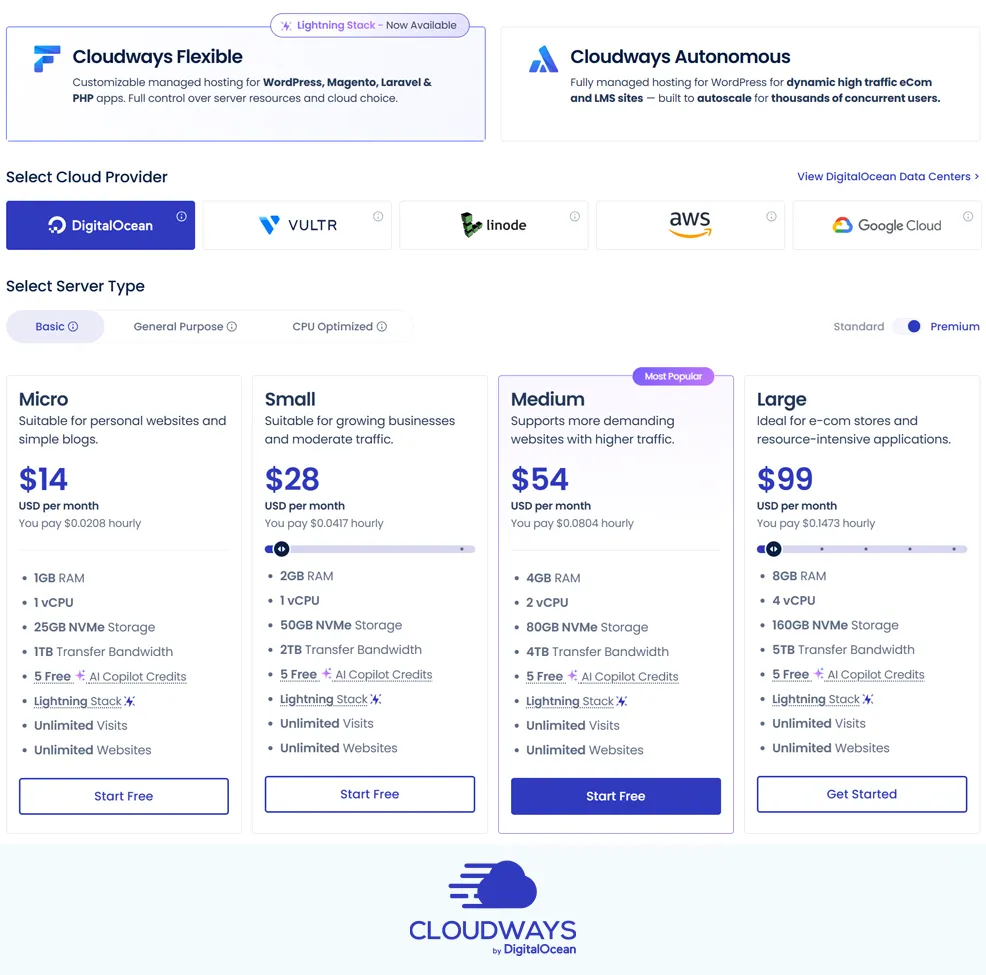
Cloudways does not use the same kind of fixed shared-hosting lineup that many mainstream hosts do. Instead, you choose an infrastructure provider and then pick a server size based on RAM, CPU, storage, and bandwidth. The platform supports DigitalOcean, Vultr, Linode, AWS, and Google Cloud, which means buyers can choose lower-cost configurations or move toward more enterprise-style infrastructure depending on their needs.
Entry-Level Pricing
The most affordable Cloudways plans usually begin on DigitalOcean, Vultr, or Linode-backed servers. In practical terms, entry pricing commonly starts around $14 per month, with higher-performance premium options and larger server sizes increasing from there. That makes Cloudways much more expensive than ultra-budget shared hosting, but often reasonable relative to premium managed WordPress hosts and far easier than self-managing a raw VPS.
Renewal Pricing and Hidden Costs
Cloudways pricing is more transparent than the deep-discount intro pricing used by many shared hosts because it generally follows a pay-as-you-go model rather than relying on low teaser rates and high renewals. However, that does not mean the total cost is always low. Buyers still need to account for optional add-ons, provider upgrades, external email solutions, Cloudflare-related services, or security extras depending on the setup they want.
The key detail is that Cloudways charges a management premium above the base infrastructure cost. That premium can be very fair for users who value simplified management, backups, security updates, deployment tools, and support, but less compelling for advanced users who would rather rent directly from DigitalOcean or another cloud provider and manage everything themselves.
Value Assessment
For agencies, WordPress professionals, WooCommerce stores, and developers, Cloudways offers strong value because it bundles cloud flexibility with a managed experience. For complete beginners who only need a simple brochure site, it may be more hosting power and more monthly cost than necessary. Overall, Cloudways tends to deliver its best value for users who have outgrown bargain shared hosting but do not want the complexity of a fully unmanaged server.
| Plan Tier | Starting Price | Key Resources | Best For |
|---|---|---|---|
| DigitalOcean Standard | About $14/mo | Entry managed cloud server, scalable RAM/CPU choices, managed backups, SSL, monitoring, staging, and Cloudways platform tools | WordPress sites, small business projects, freelancers, and users moving up from shared hosting |
| DigitalOcean Premium / Vultr HF / Linode | Typically above entry tier | Higher-performance infrastructure, faster storage options, stronger compute profiles, same managed platform layer | Growing business sites, WooCommerce, busier WordPress installs, agency hosting |
| AWS / Google Cloud | Usually much higher than entry plans | Enterprise-grade infrastructure options, broader geographic flexibility, more expensive but highly scalable configurations | Larger projects, advanced workloads, global deployments, businesses with more demanding hosting needs |
Pricing note: Cloudways is usually more expensive than renting raw cloud infrastructure directly, but the extra cost pays for the managed layer, support, monitoring, backups, deployment tools, and convenience.
Ready to try Cloudways?
If your priority is faster managed cloud hosting with more flexibility than standard shared hosting, Cloudways may be worth serious consideration. Review the latest plans, features, and pricing directly on the provider’s site before signing up.
Performance and Speed
Performance is one of the main reasons buyers consider Cloudways in the first place, and in that area it generally compares well. The platform is built around a performance-focused software stack that includes Nginx, Apache, PHP-FPM, Varnish, Memcached, Redis, and Object Cache Pro support, giving it a stronger technical foundation than many traditional shared hosts.
Cloudways also benefits from the fact that you are selecting real cloud infrastructure rather than a vague shared-hosting environment with opaque limits. That means users can size servers more intentionally, move to stronger providers, and scale resources when traffic or application demands increase. For WordPress, WooCommerce, and PHP-based applications, that flexibility can lead to noticeably better responsiveness and more consistent behavior under load.
It is still important to match the server to the workload. A tiny entry server can only do so much, and performance depends on site optimization, caching setup, plugin quality, and traffic profile. Even so, Cloudways is usually chosen because it offers a more serious performance path than low-cost shared hosting while remaining easier than full DIY cloud management.
Ease of Use and Setup
Cloudways is easier to use than unmanaged cloud hosting, but it is not as foolproof as beginner-first shared hosts. The custom dashboard is well organized and gives users access to applications, servers, staging, backups, team management, SSL, domains, monitoring, and scaling tools from one place. That is a major convenience compared with configuring a raw cloud instance manually.
At the same time, new users should expect a moderate learning curve. Because Cloudways exposes more infrastructure choices and technical settings than typical bargain hosts, it can feel less simple at first. Choosing a cloud provider, deciding between standard and premium infrastructure, understanding server sizing, and managing external email or DNS services all require a bit more confidence than clicking through a basic shared-hosting signup flow.
For technically comfortable users, that tradeoff often feels worthwhile. For true beginners launching a first website with minimal technical interest, it may feel more advanced than necessary.
Developer and Advanced Features
Developer flexibility is one of Cloudways’ strongest areas. The platform includes Git integration, SSH and SFTP access, staging environments, PHP version control, application cloning, team collaboration features, and one-click deployment for common PHP applications. That makes it much more attractive than hosts that focus only on simple consumer website setup.
Cloudways is also popular with agencies because it can handle multiple client websites without requiring a fully self-managed infrastructure workflow. Users can launch servers, isolate projects, migrate WordPress sites, clone apps, monitor performance, and scale resources from one control layer. It is not the same as having unrestricted root control over a raw server, but that limitation is part of what allows Cloudways to provide a more managed experience.
In short, Cloudways sits in a useful middle position. It is more capable and infrastructure-aware than standard shared hosting, but less operationally demanding than building everything directly on AWS or DigitalOcean alone.
Security, SSL, and Backups
Cloudways includes the security basics most serious site owners expect, such as free SSL certificates, dedicated firewalls, automated healing features, server-level protections, monitoring, and managed patching on the platform side. It also supports automated and on-demand backups, which is a major advantage for websites that change frequently or cannot afford long recovery windows.
Backup flexibility is one of the more practical strengths here. Users can configure automated backups and also trigger manual backups before major updates or changes. That can be especially useful for WooCommerce stores, agency environments, and active WordPress sites where even small mistakes can become expensive if there is no recent recovery point.
Still, buyers should think of Cloudways security as a strong hosting-layer foundation rather than a complete replacement for site-level best practices. Users still need to secure WordPress itself, keep plugins updated, use strong authentication, and maintain a broader website security strategy if the project is business-critical.
Customer Support
Support is one of the more debated parts of Cloudways. Many users report positive experiences, especially when dealing with migrations, server setup, or troubleshooting within the managed platform. The company offers 24/7 live chat and ticket-style support along with documentation and community resources, which gives users several ways to get help.
That said, support sentiment is not uniformly glowing. Some users are very happy with the responsiveness and technical help, while others describe inconsistent experiences, particularly when the issue involves billing, limits of the managed setup, or more complex infrastructure questions. This means Cloudways support is often viewed as good overall, but not untouchable.
In practical terms, it is better than going fully unmanaged and having no platform-level help, but buyers expecting elite concierge service should still compare alternatives.
Scalability and Flexibility
Scalability is one of Cloudways’ biggest advantages. Users can start on a smaller managed cloud server and move upward as traffic, client count, or application complexity grows. Because the platform is built on top of multiple infrastructure providers, there is more room to evolve than on a host that mainly sells fixed shared plans.
This makes Cloudways a good fit for websites that are already growing or expected to grow. Agencies can add more client projects, ecommerce stores can move into stronger server tiers, and developers can choose different providers based on budget or performance goals. It is not a fully custom enterprise cloud environment, but it gives most SMB and agency users enough flexibility to avoid outgrowing the platform too quickly.
Scalability takeaway: Cloudways is best suited for websites and teams that want an easier path from a modest cloud server to stronger managed infrastructure without rebuilding everything from scratch.
Data Centers and Global Reach
Cloudways has strong geographic reach because it relies on large cloud infrastructure providers rather than a tiny in-house footprint. Through DigitalOcean, AWS, Google Cloud, Linode, and Vultr, users can deploy in multiple regions around the world and choose server locations that better match their audience.
That matters for both speed and business flexibility. A site serving North America, Europe, Asia, or a more distributed customer base can often choose a location closer to its users and reduce latency. For international projects, that is a meaningful advantage over hosting providers with only a narrow set of data center options.
As always, users should confirm exact region availability for the provider and server family they want, since available locations and configurations can vary by infrastructure partner.
Who Is Cloudways Best For?
Best For
- WordPress and WooCommerce users who want stronger hosting than typical shared plans
- Agencies managing multiple client websites
- Developers and technical site owners who want cloud flexibility without full server administration
- Growing businesses that expect traffic growth or need better scaling options
- Users who value performance tuning, staging, backups, and infrastructure choice
Not Ideal For
- Absolute beginners who want the cheapest and simplest possible first hosting account
- Users who would rather pay as little as possible and manage a raw VPS themselves
- Buyers who want bundled domain, email, and traditional shared-hosting simplicity in one package
- Projects that specifically require unrestricted root-level server control
Ready to try Cloudways?
If your priority is faster managed cloud hosting with more flexibility than standard shared hosting, Cloudways may be worth serious consideration. Review the latest plans, features, and pricing directly on the provider’s site before signing up.
How We Evaluated Cloudways
For this review, we evaluated Cloudways based on its pricing structure, infrastructure flexibility, performance-oriented software stack, ease of setup, developer tooling, backup and security features, support model, scalability, and overall value relative to both budget shared hosting and other managed hosting platforms.
We also considered broader user sentiment and review patterns to understand where Cloudways performs especially well in practice, including speed, flexibility, and multi-site management, as well as where criticism tends to cluster, such as pricing versus unmanaged VPS options, occasional support inconsistency, and complexity for newer users.
Scoring Breakdown
| Category | Score |
|---|---|
| Performance | 9.2/10 |
| Ease of Use | 8.4/10 |
| Pricing/Value | 8.7/10 |
| Features | 9.3/10 |
| Security/Backup | 9.0/10 |
| Support | 8.5/10 |
| Scalability | 9.4/10 |
| Overall | 9.0/10 |
Top Alternatives to Cloudways
If Cloudways does not seem like the right fit, readers may also want to consider alternatives such as SiteGround, Kinsta, and ScalaHosting. SiteGround can be a better fit for users who want a more mainstream managed hosting experience, Kinsta is attractive for users who want a more premium WordPress-specific platform, and ScalaHosting may appeal to buyers who want stronger VPS-oriented growth options with a different support and pricing mix.
Final Verdict
Cloudways is a strong hosting option for agencies, WordPress professionals, developers, ecommerce projects, and growing businesses that want cloud-level performance and flexibility without managing every server detail themselves.
Its biggest strengths are infrastructure choice, performance-focused tooling, scalable resources, and a feature set that works well for more serious websites. Its biggest weaknesses are that it costs more than raw cloud hosting, feels more advanced than beginner shared hosting, and may still require extra services for things like email or certain premium add-ons.
For many readers, that tradeoff will make sense. If your goal is to move beyond low-end hosting into a more capable managed cloud platform, Cloudways is one of the more compelling options in its category. If your priority is rock-bottom pricing, full root control, or the most beginner-friendly experience possible, you should compare other providers before committing.
Ready to try Cloudways?
If your priority is faster managed cloud hosting with more flexibility than standard shared hosting, Cloudways may be worth serious consideration. Review the latest plans, features, and pricing directly on the provider’s site before signing up.
Frequently Asked Questions
Is Cloudways good for beginners?
Cloudways is easier than unmanaged cloud hosting, but it is not the simplest beginner host on the market. It is best for users who want more control and better infrastructure than basic shared hosting, even if that means a slightly steeper learning curve.
Does Cloudways offer shared hosting?
No, not in the traditional sense. Cloudways focuses on managed cloud hosting built on providers like DigitalOcean, Vultr, Linode, AWS, and Google Cloud rather than low-cost shared hosting plans.
Is Cloudways expensive?
It is more expensive than bargain shared hosting and usually more expensive than renting a raw VPS directly. However, the added cost covers the managed platform, backups, support, monitoring, security features, and deployment tools.
Does Cloudways include free SSL and backups?
Yes. Cloudways includes free SSL and supports both automated and on-demand backups. Backup settings can be configured based on how often your site changes and how much recovery flexibility you need.
Who should choose Cloudways over competitors?
Cloudways is a strong choice for users who want managed cloud flexibility, better scaling, and stronger performance than typical shared hosting. It is especially appealing for WordPress professionals, agencies, WooCommerce stores, and growing business sites.
Editorial note: Hosting plans, pricing, features, and policies can change over time. Before signing up, always confirm the latest details directly on the provider’s site.