
Our DigitalOcean Review & Analysis for 2026
 By:
By: Table of Contents
- Quick Facts
- What Is DigitalOcean?
- Plans, Pricing, and Overall Value
- Performance and Speed
- Ease of Use and Setup
- Developer and Advanced Features
- Security, SSL, and Backups
- Customer Support
- Scalability and Flexibility
- Data Centers and Global Reach
- Who Is DigitalOcean Best For?
- How We Evaluated DigitalOcean
- Scoring Breakdown
- Top Alternatives
- Final Verdict
- Frequently Asked Questions
Pros
- Transparent cloud pricing with low starting costs for Droplets and a free App Platform static tier
- Cleaner and easier to understand than many hyperscale cloud platforms
- Strong ecosystem of infrastructure services including compute, storage, databases, networking, and Kubernetes
- Good fit for developers, SaaS apps, APIs, agencies, and custom WordPress/Linux stacks
- Per-second billing on Droplets with monthly caps helps keep usage predictable
- Strong documentation, community tutorials, and a long-standing developer reputation
Cons
- Not a traditional beginner shared host with cPanel or bundled hand-holding
- Support quality is a recurring pain point in some user reviews and Reddit discussions
- Real-world costs can rise once backups, databases, load balancers, or higher-resource instances are added
- Raw Droplets still require users to manage patching, hardening, deployment, and maintenance
- Spec-per-dollar value may not look as aggressive as some lower-cost VPS competitors
Ready to try DigitalOcean?
If you want cloud hosting with predictable pricing, flexible infrastructure, and a more approachable experience than many large cloud providers, DigitalOcean may be worth a closer look. Review the latest plans, features, and pricing directly on the provider’s site before signing up.
Quick Facts
| Provider | DigitalOcean |
|---|---|
| Hosting Type | Cloud VPS, App Platform, Kubernetes, Managed Databases, Storage, Networking |
| Starting Price | $4/month for Droplets; $0/month for App Platform static sites |
| Renewal Price | No traditional promotional renewal structure; usage-based monthly billing |
| Billing Style | Monthly billing with per-second pricing for Droplets and monthly caps |
| Storage | SSD-backed Droplets, block storage volumes, Spaces object storage, network file storage |
| CPU/RAM | Predefined Droplet sizes with scalable vCPU and memory options; shared and dedicated choices on some products |
| Control Panel | Custom DigitalOcean cloud dashboard |
| Managed Hosting Available | Yes, via App Platform, Managed Databases, Kubernetes, and related services |
| Root Access | Yes, on Droplets |
| Data Center Locations | Multiple regions across North America, Europe, and Asia |
| Uptime SLA | Varies by product; SLAs are published for several core services |
| Free SSL | Yes, automatic HTTPS on App Platform; SSL can also be configured on self-managed deployments |
| Backups | Available for Droplets and included daily backups on some managed products such as Managed Databases |
| Support | Documentation, tickets, community resources, and tiered paid support; live chat on higher support plans |
| Best For | Developers, startups, technical teams, agencies, SaaS apps, and custom infrastructure projects |
Bottom line: DigitalOcean stands out as a straightforward cloud hosting platform that gives users more control and scalability than traditional web hosts without the complexity of a hyperscaler. Its main tradeoff is that many setups remain self-managed, so it makes the most sense for users who are comfortable handling at least some infrastructure responsibilities.
What Is DigitalOcean?
DigitalOcean is a cloud infrastructure provider built around simple virtual machines called Droplets, along with a broader platform that includes App Platform, managed Kubernetes, managed databases, object storage, block storage, networking tools, and developer-oriented services. Rather than trying to be a bargain shared host for absolute beginners, it positions itself as an easier-to-use cloud platform for modern websites and applications.
Its core appeal is that it gives users relatively clean cloud primitives, transparent pricing, and a manageable learning curve compared with larger cloud providers. That makes it attractive to developers, technical founders, agencies, and growing businesses that need flexibility but do not want to start with the operational complexity of AWS, Azure, or Google Cloud.
Plans, Pricing, and Overall Value
Plan Types
DigitalOcean’s lineup is broader than a standard web host, but its offerings are still fairly easy to understand. Droplets are its self-managed virtual servers and remain the default starting point for many websites, APIs, and custom stacks. App Platform is a more managed way to deploy applications and static sites without running the underlying infrastructure yourself. Beyond that, DigitalOcean also offers managed Kubernetes, managed databases, load balancers, volumes, Spaces object storage, and other building blocks that can be combined into a more production-ready hosting stack.
Entry-Level Pricing
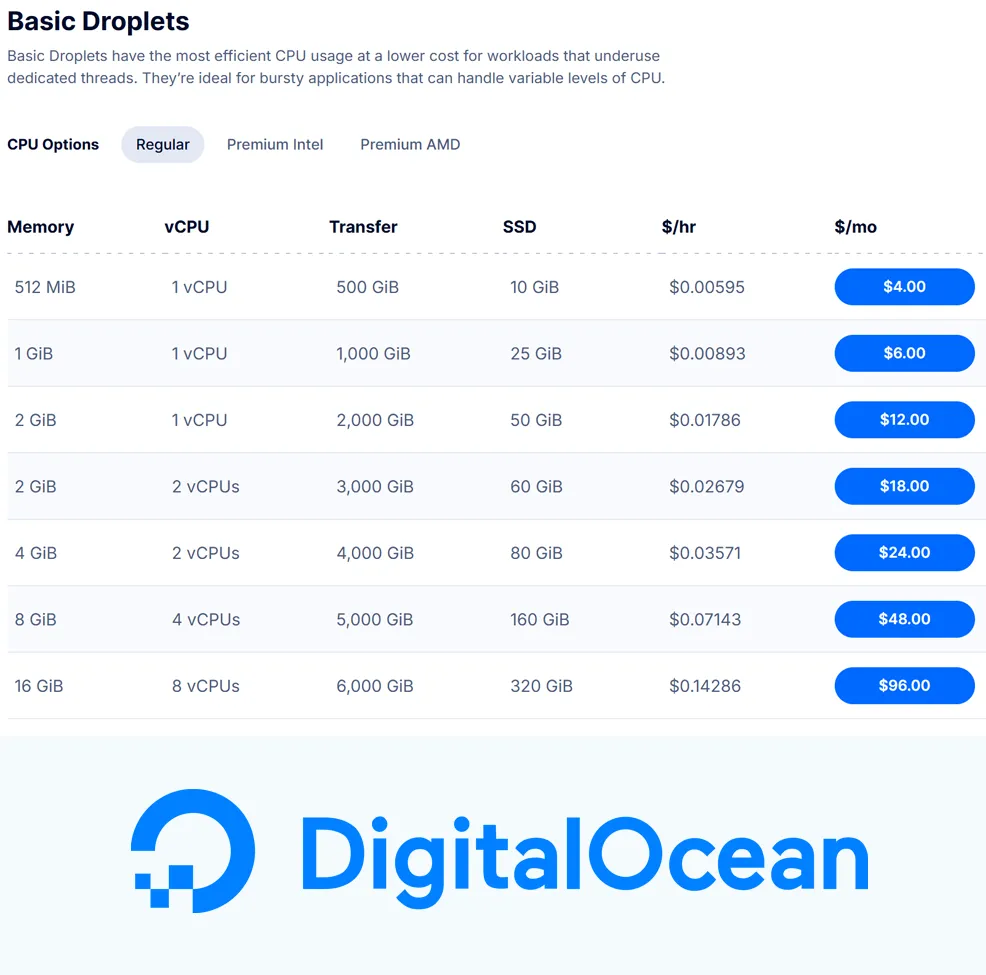
Entry pricing is one of DigitalOcean’s biggest strengths, especially for technically comfortable users. Basic Droplets start at $4/month, while App Platform includes a free tier for up to three static-site apps. Paid App Platform plans begin at $5/month for a fixed shared instance, giving users an alternative to managing a server directly if they want a simpler deployment workflow.
Ongoing Costs and Cost Creep
Unlike many traditional web hosts, DigitalOcean does not rely on the classic low-intro-price then high-renewal model. Pricing is usage-based and generally more transparent. That said, shoppers should not confuse a low starting price with a fully built hosting environment. A realistic production setup may also need backups, a managed database, extra transfer, a load balancer, additional storage, or stronger instances, and those extras can push the monthly bill well beyond the headline Droplet price.
This is especially important if you're comparing DigitalOcean with shared hosts. A $4 Droplet is inexpensive infrastructure, but it is not the same as a beginner plan that bundles email, one-click site management, support-heavy onboarding, and lots of preset conveniences. DigitalOcean can be a very good value, but the value comes from flexibility and control more than all-in-one simplicity.
Value Assessment
For developers, startups, and technical teams, DigitalOcean offers strong value. The platform covers most of the core services needed to launch modern sites and apps, and it does so without the pricing sprawl or overwhelming console complexity common to larger clouds. For non-technical beginners, the value case is weaker because the platform expects more operational knowledge and offers less “done for you” convenience than classic web hosting brands.
| Plan Tier | Starting Price | Key Resources | Best For |
|---|---|---|---|
| Basic Droplet | $4/mo | Entry-level cloud VM, SSD storage, outbound transfer allowance starting at 500 GiB, full server control | Small apps, development servers, lightweight websites, custom stacks |
| App Platform Free | $0/mo | Up to 3 static-site apps, automatic HTTPS, custom domain support, global CDN | Portfolios, landing pages, docs sites, small static projects |
| App Platform Paid | $5/mo | Managed deployment, shared or dedicated compute, autoscaling on dedicated instances, OS patching, rollback support | Managed web apps, startups, teams that want less server administration |
| Kubernetes | $12/mo | Managed Kubernetes service with additional infrastructure billed separately | Containerized applications and teams using orchestration |
Pricing note: DigitalOcean pricing is generally transparent, but the base compute cost is only part of the picture. You should account for backups, storage, databases, transfer overages, and support plans when estimating total monthly cost.
Ready to try DigitalOcean?
If you want cloud hosting with predictable pricing, flexible infrastructure, and a more approachable experience than many large cloud providers, DigitalOcean may be worth a closer look. Review the latest plans, features, and pricing directly on the provider’s site before signing up.
Performance and Speed
Performance is one of the reasons DigitalOcean remains popular with developers. In practical use, it is widely regarded as fast enough for a large range of websites, web apps, APIs, and small-to-mid-sized production workloads, especially when compared with traditional shared hosting. SSD-backed infrastructure, relatively clean provisioning, and a straightforward cloud model help it deliver a performance profile that is usually more consistent than low-end shared hosting plans.
That said, performance is not as simple as “DigitalOcean is fast.” Results vary by Droplet type, underlying hardware generation, region, and workload. Some independent reviewers have praised its disk and network performance, while benchmark sites have noted that lower-end plans do not always deliver the strongest raw CPU value versus all competitors. In other words, the platform tends to perform well in the real world, but smart buyers should still choose instance types based on their actual workload rather than assuming every plan is equally strong.
For brochure sites, blogs, SaaS dashboards, APIs, and custom WordPress or Laravel deployments, DigitalOcean is often more than capable. For larger traffic volumes or business-critical apps, stronger Droplets, load balancing, database tuning, caching, or App Platform/Kubernetes architectures make more sense than treating the smallest entry VM as a one-size-fits-all solution.
Ease of Use and Setup
Ease of use is one of DigitalOcean’s better qualities relative to other cloud platforms, but you should understand what that means. Compared with AWS or Google Cloud, DigitalOcean is notably simpler and easier to navigate. Compared with beginner web hosts, however, it is still more technical and more hands-on. The dashboard is clean, the terminology is relatively approachable, and many tasks are easier to find than they are on larger cloud platforms.
Initial setup depends heavily on which product you choose. App Platform is the easier path because DigitalOcean handles more of the application runtime and infrastructure management for you. Droplets are different: they are straightforward to launch, but you are still responsible for configuring the operating system, web server, deployment workflow, security settings, and maintenance. For experienced users, that is a benefit. For beginners, it can feel like a lot very quickly.
This is why DigitalOcean often lands in a middle ground. It is not the easiest host on the market, but it is one of the easier cloud platforms. That distinction matters, because many people looking for “web hosting” are really looking for a guided site-launch experience, while DigitalOcean is better thought of as simplified cloud infrastructure.
Developer and Advanced Features
This is where DigitalOcean is at its best. The platform has long been popular with developers because it offers the core tools needed to build and run modern applications without burying users under sprawling enterprise menus. Droplets, APIs, managed databases, Kubernetes, VPC networking, container registry, load balancers, object storage, and automation-friendly workflows make it well suited for teams that want flexibility without jumping straight into hyperscaler complexity.
App Platform also deserves mention because it broadens DigitalOcean’s appeal beyond pure server administration. It supports deployment from Git repositories, automatic HTTPS, managed runtimes, scaling options, and rollback-friendly workflows. For users who want to ship code without managing every system-level detail, App Platform is one of the more important reasons to consider DigitalOcean over a raw VPS-only competitor.
At the same time, this is not a full enterprise platform with every advanced compliance, governance, or global multi-service feature you would find in AWS or Azure. DigitalOcean’s strength is that it covers the essentials well and keeps the experience relatively understandable. For many startups and agencies, that is more valuable than having every possible cloud feature under the sun.
Security, SSL, and Backups
DigitalOcean offers a respectable cloud-security foundation, but security is still very much a shared responsibility. The platform provides free cloud firewalls, VPC networking, SSH key authentication, monitoring, backups, and related controls, and App Platform includes automatic HTTPS plus DDoS mitigation for supported app deployments. These are meaningful baseline features, especially compared with lower-end hosts that historically cut corners on infrastructure controls.
However, the level of built-in convenience depends on the product you use. On App Platform, much of the SSL and runtime maintenance work is handled for you. On Droplets, you are closer to the infrastructure, which means hardening, patching, service configuration, certificate handling, update strategy, and restoration planning remain your responsibility unless you layer on more managed services and good operational discipline.
Backups are available, but you should treat them as part of a broader recovery plan rather than the whole plan. DigitalOcean offers backup options for Droplets and includes daily backups on some managed services, such as Managed Databases. Even so, serious site owners should maintain off-platform backups, test restorations, and avoid assuming that any single backup feature is enough on its own for mission-critical workloads.
Customer Support
Support is one of the most mixed parts of the DigitalOcean story. The company has strong documentation, a long-running tutorial ecosystem, and support plans that range from a free Starter tier to Developer, Standard, and Premium options. Standard and higher tiers add faster response targets, while Premium support is positioned for mission-critical environments and advertises response times within 30 minutes.
Where sentiment gets more complicated is day-to-day user experience. Many customers appreciate the documentation and find basic assistance adequate, especially if they are already comfortable troubleshooting Linux or deployment issues themselves. At the same time, user reviews and Reddit discussions repeatedly surface frustration around support depth, response consistency, or the feeling that DigitalOcean is best when you do not need much hand-holding in the first place.
That makes DigitalOcean support highly expectation-dependent. If you want a platform with lots of docs and a relatively straightforward product set, it can work well. If you expect premium concierge support on an entry-level spend, or you want phone-based help for non-technical site management, this is probably not the right host.
Scalability and Flexibility
Scalability is one of DigitalOcean’s strongest selling points. A project can start as a tiny static site on App Platform, move to a small Droplet, then grow into a setup with managed databases, load balancers, Kubernetes, storage services, VPC networking, and more. That gives users a practical path from side project to production architecture without forcing an immediate move to a much larger cloud ecosystem.
The platform is especially strong for teams that want modular scaling. Instead of buying a single hosting plan that tries to do everything, users can add infrastructure as needed: more compute, more storage, managed databases, private networking, or a more automated deployment model. This gives DigitalOcean more long-term flexibility than conventional shared hosts, especially for developers and startups.
Its limits are less about technical dead ends and more about organizational needs. Businesses with extreme global scale, highly specialized compliance requirements, or deep enterprise procurement and governance needs may outgrow DigitalOcean or prefer a hyperscaler. But for a very large range of startups, agencies, and modern web applications, the platform offers more than enough headroom.
Scalability takeaway: DigitalOcean is especially appealing for projects that may start small but need a realistic path into stronger cloud infrastructure later without changing platforms immediately.
Data Centers and Global Reach
DigitalOcean’s regional footprint is large enough for many startups and web businesses, though it is not as globally expansive as AWS, Google Cloud, or Azure. The company operates across multiple regions in North America, Europe, and Asia, which gives customers practical options for serving audiences in major markets and reducing latency compared with a single-region budget host.
For many use cases, that footprint is entirely adequate. Developers can choose regions closer to their users, and App Platform also adds CDN-backed delivery for static content. The main caveat is that customers with very specific geographic or compliance needs should verify exact regional availability for the product they plan to use, because cloud product location coverage can differ by service.
In other words, DigitalOcean’s global reach is not its headline differentiator, but it is strong enough for a large portion of the market it serves. For small businesses, agencies, SaaS products, and content-driven sites targeting mainstream regions, it usually provides enough geographic flexibility to deploy intelligently.
Who Is DigitalOcean Best For?
Best For
- Developers who want cloud infrastructure without hyperscaler complexity
- Startups and SaaS teams building custom web apps, APIs, and internal tools
- Agencies managing multiple client sites or custom application deployments
- Technical WordPress or Linux users who want more control than shared hosting provides
- Projects that may need to scale into managed databases, Kubernetes, or load-balanced environments later
Not Ideal For
- Beginners who want cPanel, phone support, bundled email, and a highly guided setup
- Users who are uncomfortable managing servers, updates, security hardening, or troubleshooting
- Shoppers focused only on getting the absolute most RAM or disk for the lowest possible VPS price
- Large enterprises needing the broadest global cloud footprint or advanced compliance tooling
Ready to try DigitalOcean?
If you want cloud hosting with predictable pricing, flexible infrastructure, and a more approachable experience than many large cloud providers, DigitalOcean may be worth a closer look. Review the latest plans, features, and pricing directly on the provider’s site before signing up.
How We Evaluated DigitalOcean
For this review, we considered DigitalOcean’s product lineup, starting costs, billing model, infrastructure flexibility, ease of deployment, developer tooling, support structure, security controls, backup options, scalability, and overall value for the users most likely to consider a developer-oriented cloud host.
We also looked at broader reviewer sentiment and user commentary patterns, including recurring praise around simplicity and pricing clarity as well as common complaints involving support experience, self-management burden, and the gap between base instance pricing and the cost of a more production-ready setup.
Scoring Breakdown
| Category | Score |
|---|---|
| Performance | 8.8/10 |
| Ease of Use | 8.1/10 |
| Pricing/Value | 8.8/10 |
| Features | 9.0/10 |
| Security/Backup | 8.3/10 |
| Support | 7.6/10 |
| Scalability | 9.1/10 |
| Overall | 8.7/10 |
Top Alternatives to DigitalOcean
If DigitalOcean does not seem like the right fit, you may also want to consider alternatives such as Vultr, Linode, and Cloudways. Vultr and Linode appeal to users shopping for cloud VPS infrastructure in a similar category, while Cloudways can make more sense for users who want managed hosting on top of cloud infrastructure with less direct server administration.
Final Verdict
DigitalOcean is a strong hosting option for developers, startups, agencies, and technically comfortable businesses that want cloud infrastructure with cleaner pricing and a simpler experience than the biggest cloud platforms.
Its biggest strengths are transparent billing, a strong platform ecosystem, practical scalability, and a user experience that is easier to understand than many infrastructure-heavy competitors. Its biggest weaknesses are that support is not universally loved, the platform is still too technical for many beginners, and production-ready costs can be higher than the base server price suggests once additional services are layered in.
For many, that tradeoff will make perfect sense. If your priority is flexibility, control, and a realistic path to scale, DigitalOcean is one of the better mid-market cloud hosting platforms. If your priority is a traditional beginner host with maximum hand-holding, bundled conveniences, and minimal infrastructure responsibility, you may want to compare alternatives before committing.
Ready to try DigitalOcean?
If you want cloud hosting with predictable pricing, flexible infrastructure, and a more approachable experience than many large cloud providers, DigitalOcean may be worth a closer look. Review the latest plans, features, and pricing directly on the provider’s site before signing up.
Frequently Asked Questions
Is DigitalOcean good for beginners?
Not entirely. DigitalOcean is easier to use than many large cloud providers, but it is still more technical than a standard shared web host. It is usually a better fit for users who are comfortable with cloud concepts or willing to learn them.
Does DigitalOcean offer traditional shared hosting?
No, not in the usual cPanel-style sense. DigitalOcean focuses on cloud infrastructure such as Droplets, App Platform, managed databases, Kubernetes, and related services rather than classic shared hosting plans.
Is DigitalOcean expensive?
It can be inexpensive to start, especially with $4 Droplets and the App Platform free tier for static sites. The bigger question is total stack cost. Once you add backups, databases, stronger instances, extra bandwidth, or support, the monthly cost can rise noticeably.
Does DigitalOcean include free SSL and backups?
Automatic HTTPS is included on App Platform, and SSL can be configured on self-managed deployments as well. Backups are available across the platform, but the exact experience depends on the product. Users should still maintain their own broader backup and recovery strategy.
Who should choose DigitalOcean over competitors?
DigitalOcean is a strong choice for developers, agencies, startups, and technical teams that want cloud hosting with transparent pricing, good documentation, and more flexibility than traditional web hosts without immediately stepping into hyperscaler complexity.
Editorial note: Hosting plans, pricing, features, regions, and support policies can change over time. Before signing up, always confirm the latest details directly on the provider’s site.