
Our GreenGeeks Review & Analysis for 2026

 By:
By: Table of Contents
- Quick Facts
- What Is GreenGeeks?
- Plans, Pricing, and Overall Value
- Performance and Speed
- Ease of Use and Setup
- Developer and Advanced Features
- Security, SSL, and Backups
- Customer Support
- Scalability and Flexibility
- Data Centers and Global Reach
- Who Is GreenGeeks Best For?
- How We Evaluated GreenGeeks
- Scoring Breakdown
- Top Alternatives
- Final Verdict
- Frequently Asked Questions
Pros
- Strong environmental positioning with a meaningful renewable energy match and tree-planting program
- Good shared hosting feature set, including free SSL, nightly backups, email, migrations, and cPanel
- 24/7 support via live chat, tickets, and phone
- Solid fit for WordPress users, small businesses, blogs, and brochure-style sites
- Traditional hosting setup that many users find easier to migrate into than custom dashboards
- Positive sentiment around support quality and account migration experience
Cons
- Renewal pricing is much higher than the introductory rate
- Shared hosting is good, but not the fastest option in every benchmark
- VPS lineup is more limited and less customizable than some competitors
- Premium tiers get expensive quickly for small sites
- Some users report billing frustration, migration issues, or inconsistent performance during server changes
Ready to try GreenGeeks?
If your priority is eco-friendly hosting with familiar tools, helpful support, and solid features for small to medium websites, GreenGeeks may be worth a closer look. Review the latest plans, features, and pricing directly on the provider’s site before signing up.
Quick Facts
| Provider | GreenGeeks |
|---|---|
| Hosting Type | Shared, WordPress, WooCommerce, VPS, Reseller |
| Starting Price | $2.95/month (Lite shared/WordPress plan on introductory annual pricing) |
| Renewal Price | Regular pricing is much higher after the promo term; entry plans generally renew at standard monthly rates in the low-to-mid teens |
| Billing Style | Monthly and annual terms, with the best advertised rates tied to prepaid introductory terms |
| Storage | 25 GB web space on Lite, 50 GB on Pro, 100 GB on Premium shared tiers |
| CPU/RAM | Abstracted on shared plans; dedicated allocations on managed VPS plans |
| Control Panel | cPanel |
| Managed Hosting Available | Yes |
| Root Access | Not the main selling point; GreenGeeks VPS is managed and more limited than fully customizable developer-first VPS platforms |
| Data Center Locations | Phoenix, Chicago, Toronto, Montreal, and Amsterdam |
| Uptime SLA | 99.9% |
| Free SSL | Yes |
| Backups | Nightly backups on the platform; on-demand backups on higher shared tiers |
| Support | 24/7 live chat, support tickets, phone, and knowledge base |
| Best For | Small businesses, WordPress users, blogs, agencies with lighter client sites, and eco-conscious site owners |
Bottom line: GreenGeeks stands out for combining a credible eco-friendly mission with a familiar cPanel-based hosting setup, strong support, and a useful feature set for smaller websites. The biggest tradeoffs are higher renewals after the introductory term and more limited appeal for demanding, high-scale, or highly customized workloads.
What Is GreenGeeks?
GreenGeeks is a web hosting company that offers shared hosting, WordPress hosting, WooCommerce hosting, VPS hosting, reseller hosting, domain services, and a newer AI-assisted website-building experience. Unlike many bargain hosts that compete only on price, GreenGeeks has built much of its brand around the idea that web hosting can be both practical and more environmentally responsible.
Its core appeal is fairly straightforward. GreenGeeks uses a familiar hosting stack that many site owners already understand, includes a strong baseline feature set on its plans, and backs that up with a well-known sustainability angle. That combination gives it a different identity from budget hosts that focus mostly on aggressive pricing or custom dashboards.
Plans, Pricing, and Overall Value
Plan Types
GreenGeeks offers several main product categories. Shared hosting is the entry point for most users, and its WordPress and WooCommerce offerings are closely related to those shared plans but tuned more directly toward site owners using WordPress. Beyond that, GreenGeeks offers reseller hosting for agencies and hosting businesses, plus managed VPS hosting for users who need more resources and stronger isolation than shared hosting can provide.
Entry-Level Pricing
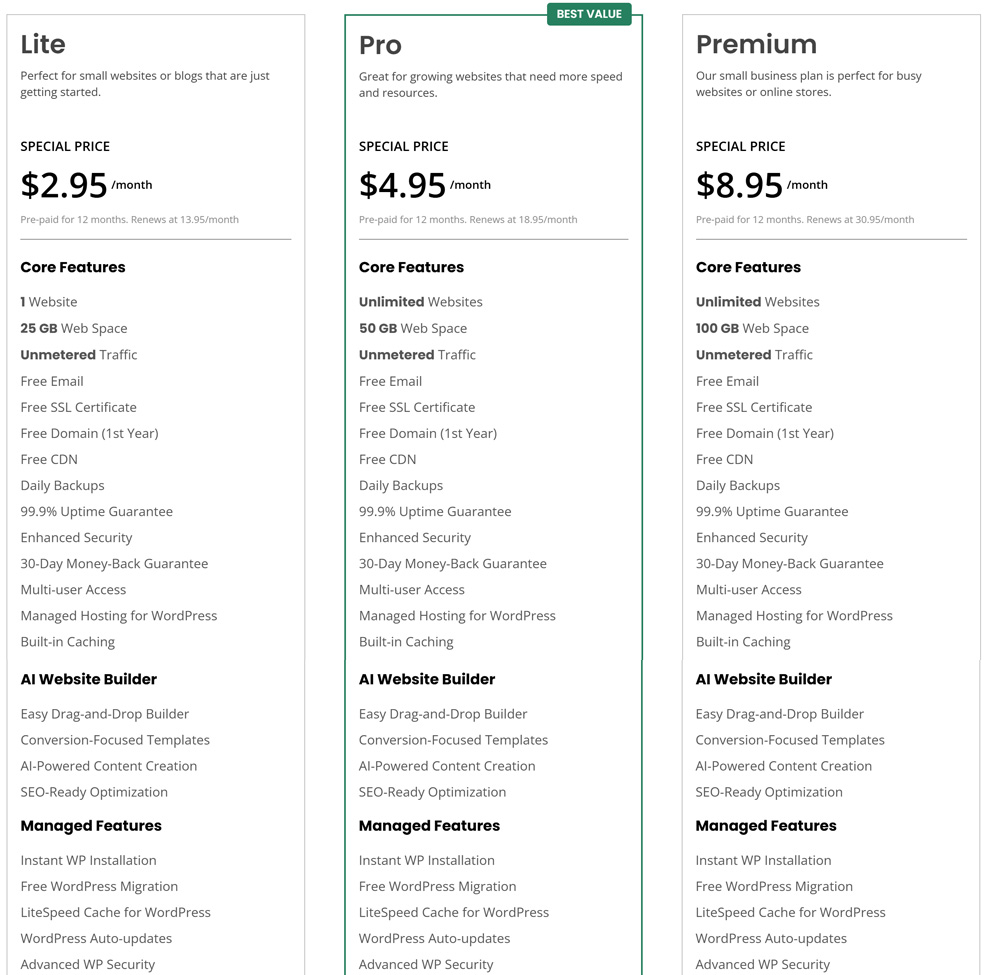
GreenGeeks typically markets its Lite plan starting at about $2.95/month on an introductory prepaid term. That is competitive enough to put it in the same broader conversation as other mainstream budget-friendly hosts, even if it is not always the absolute cheapest offer on the market. The more important point is that the baseline plan already includes meaningful essentials such as free SSL, email, migration support, nightly backups, and cPanel access.
Renewal Pricing and Hidden Costs
This is where you should slow down and read the fine print. GreenGeeks, like many hosting companies, uses strong introductory pricing to get new customers in the door. Once the initial term ends, the monthly equivalent rises materially. That does not make GreenGeeks unusual, but it does mean that the long-term value picture looks less dramatic than the headline price alone suggests.
It is also worth paying attention to what changes by tier. The Pro plan adds support for unlimited websites, more storage, and on-demand backups, while the Premium plan adds more performance-oriented extras such as object caching and higher-end bundled features. In other words, GreenGeeks can be reasonably priced at entry level, but users should compare both renewal costs and feature differences rather than shopping on promotional price alone.
Value Assessment
For blogs, business brochure sites, portfolio websites, smaller WooCommerce stores, and WordPress projects, GreenGeeks offers good overall value. Its appeal is strongest for buyers who want a familiar hosting environment, stronger-than-average support access, and a greener hosting option without jumping to a premium-managed platform. The value becomes less compelling for buyers who care most about rock-bottom renewals, ultra-fast performance under heavy load, or maximum infrastructure flexibility.
| Plan Tier | Starting Price | Key Resources | Best For |
|---|---|---|---|
| Lite | $2.95/mo | 1 website, 25 GB web space, free SSL, free email, free domain for first year, nightly backups, free migration | Personal sites, blogs, starter business websites |
| Pro | $4.95/mo | Unlimited websites, 50 GB web space, free SSL, email, nightly backups, on-demand backups, WordPress repair tool | Growing websites, multiple small sites, agencies managing lighter client projects |
| Premium | $8.95/mo | Unlimited websites, 100 GB web space, premium SSL, dedicated IP, object caching, stronger business-oriented extras | Higher-traffic sites, small stores, more demanding business projects |
Pricing note: GreenGeeks looks attractive at signup, but the regular rate after the introductory term is much higher. Always compare renewal pricing, not just the first-term promotion.
Ready to try GreenGeeks?
If your priority is eco-friendly hosting with familiar tools, helpful support, and solid features for small to medium websites, GreenGeeks may be worth a closer look. Review the latest plans, features, and pricing directly on the provider’s site before signing up.
Performance and Speed
Performance is an area where GreenGeeks lands in a solid but not category-leading position. For ordinary blogs, small business sites, and typical WordPress installs, it should be fast enough for most users, especially given that the platform leans on LiteSpeed technologies, SSD-based infrastructure, CDN integration, and other modern hosting basics. That makes it stronger than many older bargain hosts that still feel dated and underpowered.
At the same time, GreenGeeks is not consistently positioned as a top-tier performance specialist. Independent testing and user sentiment tend to describe the shared hosting experience as capable and reliable for common workloads, but not always the fastest choice under heavier load or in more demanding WordPress and ecommerce scenarios. That matters mainly for users who expect traffic spikes, more complex WooCommerce stores, or business-critical performance demands.
For the average site owner, this means GreenGeeks performance is generally good enough to be a practical recommendation. For users who view performance consistency as the single most important factor, especially at scale, a more premium managed host or a stronger cloud-focused platform may still be a better fit.
Ease of Use and Setup
Ease of use is one of GreenGeeks’ quieter strengths. Unlike some newer hosts that replace everything with a custom panel, GreenGeeks sticks with cPanel and a more familiar account workflow. For some beginners, that may feel slightly more traditional and less polished than the sleek custom dashboards offered by a few competitors. But for many users, especially those migrating from another host, that familiarity is a real advantage.
Setup is usually straightforward. Users can register or transfer a domain, migrate an existing website, install WordPress, create email accounts, configure SSL, manage backups, and access site tools without having to learn an entirely new interface. That makes GreenGeeks particularly approachable for users who have been around web hosting long enough to appreciate standard tools, or who want to avoid getting locked into a heavily customized control panel.
The main caution is that GreenGeeks feels more like a traditional web host than a slick beginner-first website platform. That is not necessarily a negative, but it does mean the user experience is more “real hosting dashboard” than “guided website builder with training wheels.”
Developer and Advanced Features
GreenGeeks is not a developer-first cloud platform, but it does cover a respectable amount of ground for more advanced users. Its hosting stack supports common tools and workflows that WordPress professionals, freelancers, and technically comfortable site owners expect, and the company clearly tries to offer more than a bare-minimum shared hosting experience.
Where GreenGeeks is less compelling is in its VPS strategy. The VPS line is more managed and constrained than what many developers want if they are looking for wide configuration flexibility, numerous plan shapes, or an infrastructure layer that can be tuned more aggressively. In other words, GreenGeeks works well as a practical host for many real-world websites, but it is not trying to compete with specialized cloud infrastructure providers.
That distinction is important. If your project is mostly about launching and running websites efficiently, GreenGeeks probably gives you enough. If your project is about building highly customized infrastructure, advanced deployment pipelines, or resource-heavy applications, you will likely outgrow its more traditional sweet spot.
Security, SSL, and Backups
GreenGeeks includes the core security basics that site owners now expect. Free SSL is included, and the platform emphasizes nightly backups across its hosting environment. Higher shared tiers also add useful extras such as on-demand backups, which can make a real difference for sites where frequent content updates, design changes, or plugin work create more risk.
Security is also one of the areas where GreenGeeks tries to look stronger than bare-bones budget providers. The company talks more openly than some competitors about platform protection, malware-related help, and a more complete managed environment rather than leaving customers fully on their own. That does not eliminate the need for good site hygiene, but it does improve the baseline package.
For serious business use, the best mindset is still to treat security as a shared responsibility. GreenGeeks provides a reasonable built-in foundation, but site owners should still keep plugins updated, use strong passwords, maintain off-platform backups, and avoid assuming the host alone is sufficient protection.
Customer Support
Support is one of GreenGeeks’ biggest selling points. The company offers 24/7 access through live chat, support tickets, and phone, and this is one of the areas where public sentiment is often especially positive. Across review platforms and user comments, GreenGeeks is frequently praised for responsive help, useful migration assistance, and support agents who seem more engaged than the minimal script-based support common at some budget hosts.
That does not mean every experience is perfect. Like any host, GreenGeeks still attracts complaints related to billing, migrations, downtime, and isolated support frustrations. But the broader pattern is more favorable than what many similarly priced providers receive. For buyers who want the reassurance of being able to call, chat, or open a ticket at any time, this can be a meaningful advantage.
Overall, GreenGeeks support sentiment is stronger than average for this segment of the hosting market, and it is one of the clearest reasons many users stay with the company after the initial signup.
Scalability and Flexibility
GreenGeeks does provide a reasonable path upward. A smaller site can start on the Lite plan, move to Pro or Premium as traffic or complexity grows, and then step into managed VPS hosting if it needs more isolated resources. That makes the platform more practical than hosts that offer only a thin shared-hosting lineup with no obvious next step.
Still, GreenGeeks scalability is best understood as incremental rather than expansive. It is good for moving from a small site to a more serious small-business or agency-friendly setup. It is less compelling for buyers who already know they need high-performance cloud architecture, broad VPS customization, or a long runway into enterprise-like workloads.
Scalability takeaway: GreenGeeks is a sensible growth path for small sites that may need better shared hosting or a managed VPS later, but it is not the most flexible destination for highly specialized or infrastructure-heavy projects.
Data Centers and Global Reach
GreenGeeks offers a more focused geographic footprint than some globally sprawling competitors, but it still gives users a useful set of practical choices. The company advertises five data center locations: Phoenix, Chicago, Toronto, Montreal, and Amsterdam. That covers North America well and provides a European option, which is enough for many small and medium websites.
That matters because choosing a data center closer to your audience can improve latency and page speed. For sites serving U.S. and Canadian audiences especially, GreenGeeks offers multiple sensible provisioning options. For users targeting more geographically diverse global audiences, this can still work well when combined with CDN services, though it is not as broad a footprint as some larger cloud-centric hosts provide.
As always, site owners should verify the best region for the specific hosting product they want and think not only about the server location itself, but also about whether caching and CDN use will play a role in overall performance.
Who Is GreenGeeks Best For?
Best For
- Small businesses that want a greener hosting option without giving up familiar tools
- WordPress users who prefer cPanel and straightforward migrations
- Bloggers, portfolio sites, content sites, and brochure-style websites
- Agencies or freelancers hosting lighter client websites
- Buyers who value strong support access, including phone support
Not Ideal For
- Users who want the absolute lowest long-term renewal cost
- High-scale ecommerce or traffic-heavy applications needing premium performance consistency
- Developers who want broad VPS customization or more infrastructure control
- Shoppers who prefer a modern custom dashboard over a more traditional cPanel environment
Ready to try GreenGeeks?
If your priority is eco-friendly hosting with familiar tools, helpful support, and solid features for small to medium websites, GreenGeeks may be worth a closer look. Review the latest plans, features, and pricing directly on the provider’s site before signing up.
How We Evaluated GreenGeeks
For this review, we considered GreenGeeks’ plan structure, introductory and renewal pricing, feature stack, use of cPanel, support options, backup/security posture, environmental positioning, upgrade path, and overall value for the kinds of users most likely to shop in this segment of the market.
We also considered broader reviewer sentiment and user-review patterns to identify where GreenGeeks appears strongest in practice, and where common complaints tend to cluster, particularly around renewal pricing, performance expectations, billing friction, and the limits of its VPS lineup.
Scoring Breakdown
| Category | Score |
|---|---|
| Performance | 8.1/10 |
| Ease of Use | 8.4/10 |
| Pricing/Value | 8.3/10 |
| Features | 8.7/10 |
| Security/Backup | 8.6/10 |
| Support | 9.0/10 |
| Scalability | 8.0/10 |
| Overall | 8.5/10 |
Top Alternatives to GreenGeeks
If GreenGeeks does not seem like the right fit, you may also want to consider alternatives such as SiteGround, DreamHost, and Cloudways. SiteGround is often a better fit for users who want a more premium managed experience and strong WordPress polish, DreamHost can appeal to users who want a simpler value-focused alternative with a different overall product philosophy, and Cloudways is attractive for buyers who want more cloud flexibility without managing everything from scratch.
Final Verdict
GreenGeeks is a strong option for small businesses, bloggers, WordPress users, and environmentally conscious site owners who want a traditional hosting experience backed by solid support and a respectable feature set.
Its biggest strengths are its eco-friendly positioning, familiar cPanel-based workflow, helpful support, nightly backups, and a plan lineup that covers many standard website needs well. Its biggest weaknesses are higher renewal pricing after the introductory term, performance that is good but not exceptional in every scenario, and a VPS offering that feels more limited than what advanced users may want.
For many people, that tradeoff will make sense. If your goal is to get reliable hosting from a company with a genuinely greener identity and a more traditional hosting toolset, GreenGeeks is easy to recommend. If your top priority is elite performance, deeper infrastructure control, or the cheapest long-term renewals, you should compare alternatives before committing.
Ready to try GreenGeeks?
If your priority is eco-friendly hosting with familiar tools, helpful support, and solid features for small to medium websites, GreenGeeks may be worth a closer look. Review the latest plans, features, and pricing directly on the provider’s site before signing up.
Frequently Asked Questions
Is GreenGeeks good for beginners?
Yes. GreenGeeks is beginner-friendly enough for most users, especially if they are comfortable with a traditional cPanel-based setup or want migration help and responsive support.
Does GreenGeeks offer VPS hosting?
Yes. GreenGeeks offers managed VPS hosting in addition to shared, WordPress, WooCommerce, and reseller hosting. The VPS options are useful for users who need more resources, though they are not the most customizable in the market.
Is GreenGeeks really eco-friendly?
That is one of its biggest differentiators. GreenGeeks promotes a strong renewable energy offset approach and also plants a tree for every new hosting account, which gives it a more credible environmental angle than most mainstream hosts.
Does GreenGeeks include free SSL and backups?
Yes. Free SSL is included, and GreenGeeks emphasizes nightly backups across its platform. Higher-tier plans also include extras such as on-demand backups.
Who should choose GreenGeeks over competitors?
GreenGeeks is a strong fit for users who want a greener host, prefer a familiar cPanel environment, value phone and chat support, and need reliable hosting for blogs, business websites, WordPress projects, and lighter ecommerce sites.
Editorial note: Hosting plans, pricing, features, and policies can change over time. Before signing up, always confirm the latest details directly on the provider’s site.