
Our WP Engine Review & Analysis for 2026
 By:
By: Table of Contents
- Quick Facts
- What Is WP Engine?
- Plans, Pricing, and Overall Value
- Performance and Speed
- Ease of Use and Setup
- Developer and Advanced Features
- Security, SSL, and Backups
- Customer Support
- Scalability and Flexibility
- Data Centers and Global Reach
- Who Is WP Engine Best For?
- How We Evaluated WP Engine
- Scoring Breakdown
- Top Alternatives
- Final Verdict
- Frequently Asked Questions
Pros
- Purpose-built managed WordPress platform instead of generic low-cost hosting
- Strong performance stack with EverCache, edge CDN, and platform-level optimization
- Daily and on-demand backups, staging/dev environments, SSH, and automated migration tools included
- 24/7 WordPress-specialized support rather than generalist hosting support
- Useful workflow features for agencies and developers, including transferable sites and GitHub Actions support
- Solid security posture with managed updates, real-time threat defense, SSL, DDoS protection, and optional Global Edge Security
Cons
- More expensive than shared hosting and many beginner-oriented WordPress hosts
- Plan economics make less sense for very small hobby sites or price-sensitive projects
- Some advanced firewall and edge-security capabilities require paid add-ons or higher tiers
- Resource ceilings and overage-style economics can be frustrating on busy lower-tier plans
- Not the best fit for users who need broad non-WordPress hosting flexibility
Ready to try WP Engine?
If your priority is premium managed WordPress hosting with stronger built-in performance, security, and workflow tools, WP Engine may be worth a closer look. Review the latest plans, features, and pricing directly on the provider’s site before signing up.
Quick Facts
| Provider | WP Engine |
|---|---|
| Hosting Type | Managed WordPress hosting, premium managed WordPress, enterprise WordPress hosting |
| Starting Price | Premium pricing; first-year promotional pricing may apply on select Essential plans |
| Renewal Price | Varies by plan; promotional first-year pricing is for new customers and renewals are subject to change |
| Billing Style | Annual and custom contract options depending on plan tier |
| Storage | Tier-based storage allocations depending on selected plan |
| CPU/RAM | Not fully exposed on standard plans; more isolated resources and higher-capacity infrastructure on upper tiers |
| Control Panel | Custom WP Engine User Portal |
| Managed Hosting Available | Yes |
| Root Access | No traditional root access on standard managed plans |
| Data Center Locations | Global delivery through CDN and edge network; infrastructure designed for international traffic |
| Uptime SLA | 99.99% uptime SLA on Core plans |
| Free SSL | Yes, with auto-renewing SSL |
| Backups | Daily and on-demand backups |
| Support | 24/7 WordPress technical support; higher-touch assistance on upper tiers |
| Best For | Businesses, agencies, ecommerce sites, publishers, membership sites, and serious WordPress users |
Bottom line: WP Engine stands out as a premium managed WordPress host for users who care more about stability, workflow, security, and expert support than bargain pricing. Its main tradeoff is cost: for the right business or agency, that premium can be justified, but for small hobby sites it will often feel excessive.
What Is WP Engine?
WP Engine is a hosting platform built specifically for WordPress rather than a general-purpose web host that happens to offer WordPress plans. The company focuses on managed infrastructure, performance optimization, security hardening, developer tools, and support delivered by teams that work in WordPress all day rather than trying to serve every hosting category at once.
That specialization shapes the entire platform. Instead of marketing the cheapest possible hosting, WP Engine emphasizes reliability, speed, operational convenience, and lower maintenance burden for growing sites. In practical terms, it aims to let site owners and teams spend less time on server work and more time on content, marketing, development, and business operations.
Plans, Pricing, and Overall Value
Plan Types
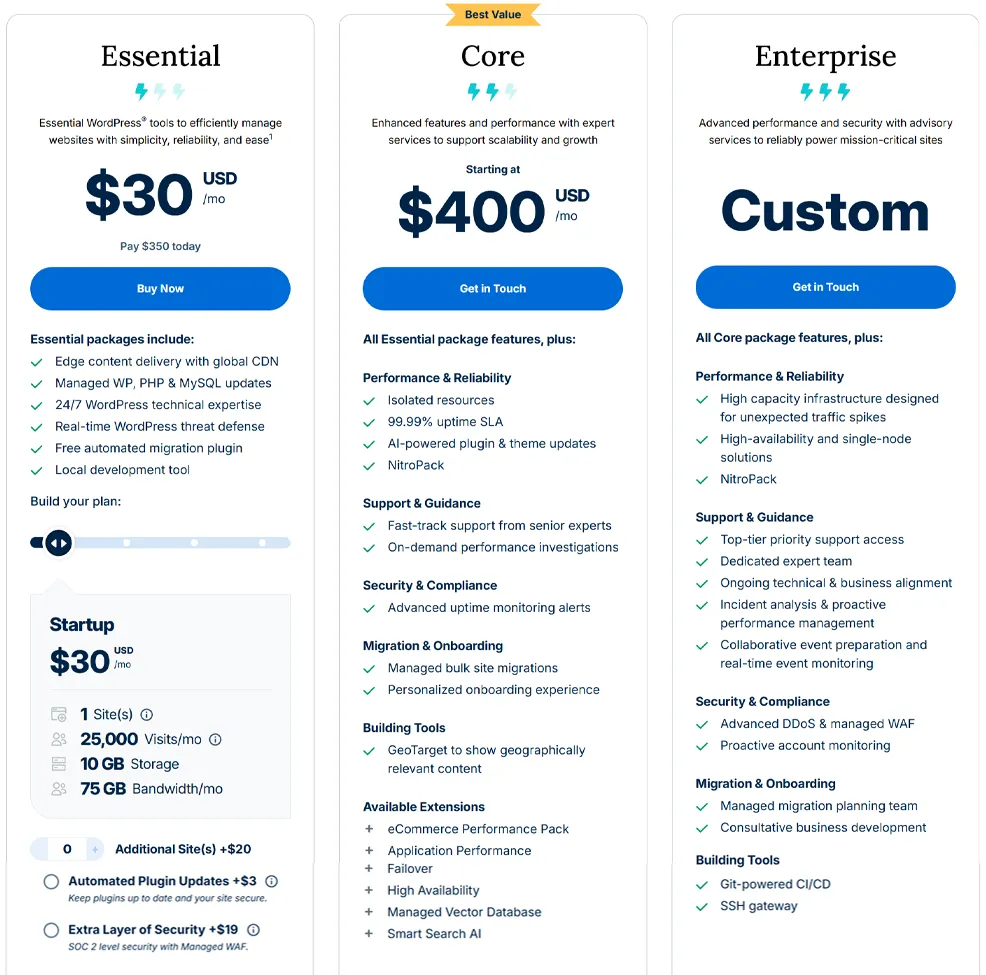
WP Engine organizes its lineup around managed WordPress rather than splitting users across generic shared, reseller, and VPS categories. The current structure centers on Essential plans for mainstream managed WordPress customers, Core plans for organizations that need more isolation and guided support, and Enterprise plans for large or mission-critical deployments that need deeper performance, security, and operational services.
Entry-Level Pricing
WP Engine is not a budget host, and that is important to understand from the start. The company does advertise first-year pricing on qualifying Essential plans for new customers, but the product is positioned as a premium managed service with platform features that go well beyond low-cost WordPress hosting. Even at the entry tier, you are paying for a curated stack that includes edge delivery, managed updates, expert support, migrations, backups, staging workflows, and built-in platform optimization.
Renewal Pricing and Cost Considerations
As with many hosting companies, promotional pricing is not the full long-term story. WP Engine’s own pricing page notes that first-year pricing and coupons apply to new customers on Essential plans only, cannot be used for renewals, and that taxes and overages may apply during checkout. That means shoppers should pay attention not only to the initial monthly figure, but also to long-term cost, visit ceilings, extra-site needs, storage allocations, and whether security add-ons or premium services will be required later.
There is also a value distinction between “cheap” and “efficient.” For a brochure site or side blog, WP Engine may look expensive. For a business site where downtime, plugin conflicts, slow support, or weak backups would cost more than the hosting bill, WP Engine’s higher price can make financial sense. The platform’s value is strongest when the site matters enough that reliability and time savings have real business value.
Value Assessment
For serious WordPress users, WP Engine’s value proposition is convenience plus risk reduction. All plans include daily and on-demand backups, staging/dev environments, auto-renewing SSL, SSH access, security patching, plugin risk scans, EverCache, Layer 3 and 4 DDoS protection, transferable sites, and automated deployment support. Those are not fringe bonuses; they are the kinds of features that reduce operational headaches for agencies, marketers, and in-house web teams.
| Plan Tier | Starting Price | Key Resources | Best For |
|---|---|---|---|
| Essential | Promotional first-year pricing may apply | Managed WordPress, edge CDN, managed WP/PHP/MySQL updates, 24/7 support, migration plugin, local dev tool, backups, staging/dev tools | Small businesses, freelancers, growing WordPress sites, agencies with moderate needs |
| Core | Starting at $400/month | All Essential features plus isolated resources, 99.99% uptime SLA, AI-powered plugin and theme updates, NitroPack, performance investigations, advanced monitoring, managed bulk migrations, onboarding support | Higher-traffic businesses, agencies, stores, publishers, and organizations needing stronger reliability and support |
| Enterprise | Custom pricing | High-capacity infrastructure, high-availability or single-node solutions, advanced DDoS and managed WAF, dedicated expert team, ongoing technical alignment, event support, Git-powered CI/CD, SSH gateway | Mission-critical WordPress environments, major brands, large publishers, and enterprise digital teams |
Pricing note: WP Engine’s lower-tier promotional pricing can look approachable at signup, but this is still a premium hosting platform. Review renewal terms, overage exposure, and plan limits before deciding.
Ready to try WP Engine?
If your priority is premium managed WordPress hosting with stronger built-in performance, security, and workflow tools, WP Engine may be worth a closer look. Review the latest plans, features, and pricing directly on the provider’s site before signing up.
Performance and Speed
Performance is one of WP Engine’s main selling points, and the platform is structured around that promise. WP Engine includes edge content delivery with a global CDN, platform-level caching through EverCache, managed PHP and MySQL updates, and on higher tiers additional tooling such as NitroPack, isolated resources, and performance investigations. The general idea is not just to rent server space, but to reduce the amount of performance work site owners must do themselves.
This matters most for WordPress because WordPress performance often falls apart when hosting, caching, plugins, and theme behavior are poorly coordinated. WP Engine tries to solve that by standardizing more of the stack. In practice, that usually translates into faster cache delivery, more stable behavior under normal business traffic, and fewer situations where users need to troubleshoot the hosting layer from scratch.
That said, premium hosting does not magically make every WordPress site fast. Bloated themes, poor plugins, excessive third-party scripts, and inefficient queries can still slow down a site. WP Engine improves the baseline and gives teams better tools, but performance still depends partly on the application itself.
Ease of Use and Setup
WP Engine’s interface is built for managed WordPress workflows rather than old-school generic hosting administration. The custom User Portal gives users centralized access to environments, domains, backups, SSL, staging, dev tools, cache controls, and support resources without burying common tasks under a traditional all-purpose hosting dashboard.
For setup, WP Engine includes a free automated migration plugin and local development tooling, which lowers the friction for users moving existing WordPress sites or building before deployment. It also supports one-click staging and development environments, which is a major quality-of-life upgrade compared with cheaper hosts where staging is missing, limited, or awkward to configure manually.
The platform is approachable for non-experts, but it is still more professional in tone than ultra-beginner shared hosting. Someone launching a first-ever hobby site may find a cheap host more psychologically simple. A business user or agency, on the other hand, will likely appreciate that WP Engine feels organized around real website operations rather than commodity hosting upsells.
Developer and Advanced Features
WP Engine is significantly stronger for developers and agencies than many low-cost WordPress hosts. Standard platform features include SSH access, local development tools, dev/staging/production environments, site copy tools, transferable sites for client handoff, and automated deployments with GitHub Actions. On enterprise-oriented tiers, the platform expands into Git-powered CI/CD, SSH gateway access, managed migration planning, and deeper operational guidance.
This is one of the reasons WP Engine remains popular with professional WordPress teams. The service is not trying to be a generic cloud playground with unrestricted root-level infrastructure customization. Instead, it gives WordPress teams a more opinionated but more efficient environment for common build, test, deploy, and maintenance workflows.
The tradeoff is control versus convenience. Developers who want total infrastructure freedom may prefer raw cloud servers or container-first platforms. Teams that want a more streamlined WordPress delivery workflow, however, often benefit from WP Engine’s guardrails.
Security, SSL, and Backups
Security is another area where WP Engine differentiates itself from cheap hosting. All plans include managed WordPress, PHP, and MySQL updates, real-time WordPress threat defense, security patching, plugin risk scans, auto-renewing SSL, SSH access, daily and on-demand backups, and Layer 3 and 4 DDoS protection. Multi-factor authentication is also part of the broader security posture described on the WordPress hosting product pages.
For users needing more advanced edge protection, WP Engine offers Global Edge Security as an add-on or bundled capability on certain plans. Global Edge Security includes a managed WAF, advanced DDoS mitigation, Cloudflare CDN integration, automatic SSL installation, image optimization through Cloudflare Polish, and traffic/security visibility in the portal. It is designed to block common web threats such as XSS, SQL injection, and CSRF while also reducing direct exposure of the origin server.
The practical takeaway is that WP Engine delivers a stronger built-in security baseline than most mass-market hosts. Still, site security is never entirely automatic. Bad plugins, poor credential hygiene, and risky admin practices can still create vulnerabilities. WP Engine reduces infrastructure risk, but site owners still need sensible WordPress security habits.
Customer Support
Support is a major part of WP Engine’s premium positioning. The company emphasizes 24/7 WordPress technical expertise, and its hosting pages state that the team specializes exclusively in WordPress. It also claims that a large share of issues are resolved on the first interaction, which aligns with the platform’s broader “expert rather than generic” support pitch.
On higher tiers, support becomes more consultative. Core plans include fast-track support from senior experts and on-demand performance investigations, while Enterprise adds a dedicated expert team, ongoing technical and business alignment, proactive incident analysis, and real-time event support. That is materially different from the support model offered by budget hosting brands, where chat often centers on basic account tasks rather than high-value WordPress operations.
Support quality is still partly situational, and no host is universally loved. But compared with low-cost hosting, WP Engine’s support model is clearly designed for users who want specialized help, not just access to a help queue.
Scalability and Flexibility
WP Engine offers a clearer managed growth path than hosts that mainly sell cheap shared plans. A team can begin on Essential, move into Core for more isolation and stronger service levels, and then graduate to Enterprise when traffic, compliance, uptime, launch-risk, or organizational complexity increase. That progression fits many growing businesses and agencies far better than hopping between unrelated hosting products.
The platform also supports scaling from an operational standpoint, not just a resource standpoint. Features like transferable sites, bulk migrations, staging, GitHub Actions, advisory support, and optional performance/security extensions make the environment more useful as teams and site portfolios grow. In other words, WP Engine scales not only by adding capacity, but by reducing workflow friction.
Scalability takeaway: WP Engine is strongest for WordPress sites that are already important to a business or are expected to become more operationally demanding over time. It is less compelling if your needs are tiny and likely to stay that way.
Data Centers and Global Reach
WP Engine’s customer-facing material puts more emphasis on global edge delivery than on marketing a simple list of raw server locations. The platform includes edge content delivery with global CDN coverage on hosting plans, and its Global Edge Security product is built on Cloudflare infrastructure with more than 250 points of presence across 300 cities in 100 countries. That matters because many real-world speed gains come from caching and edge delivery, not just from where the origin server lives.
For internationally distributed audiences, this can be a meaningful advantage. A business serving visitors across North America, Europe, and Asia may benefit more from strong edge caching and optimized routing than from choosing a single origin region alone. Businesses with strict data residency or infrastructure-location requirements should still verify the exact deployment options available for their plan and account tier before committing.
WP Engine’s higher-end positioning also shows up here: the company is selling a performance network strategy, not just a rack location.
Who Is WP Engine Best For?
Best For
- Businesses running revenue-generating or brand-critical WordPress sites
- Agencies managing multiple client sites and needing better workflows
- WooCommerce, membership, content, and lead-generation sites that need stronger stability
- Marketing teams that want WordPress performance and security handled at the platform level
- Developers and technical teams that value staging, backups, SSH, local development, and managed deployments
Not Ideal For
- Hobby sites or tiny blogs where price matters more than platform quality
- Users looking for generic shared hosting, email bundles, or non-WordPress flexibility
- Projects that need full low-level infrastructure control rather than managed WordPress guardrails
- Shoppers who primarily compare hosts on the cheapest sticker price
Ready to try WP Engine?
If your priority is premium managed WordPress hosting with stronger built-in performance, security, and workflow tools, WP Engine may be worth a closer look. Review the latest plans, features, and pricing directly on the provider’s site before signing up.
How We Evaluated WP Engine
For this review, we considered WP Engine’s plan structure, pricing model, included platform features, backup and security posture, performance tooling, support positioning, workflow capabilities, and upgrade path from standard managed WordPress to higher-tier business and enterprise deployments.
We also weighed the practical value of what WP Engine includes by default, such as edge delivery, daily and on-demand backups, staged environments, managed updates, threat defense, and WordPress-specialized support, since these elements often matter more in day-to-day use than a simple entry price alone.
Scoring Breakdown
| Category | Score |
|---|---|
| Performance | 9.1/10 |
| Ease of Use | 8.8/10 |
| Pricing/Value | 7.6/10 |
| Features | 9.2/10 |
| Security/Backup | 9.3/10 |
| Support | 8.9/10 |
| Scalability | 9.0/10 |
| Overall | 8.8/10 |
Top Alternatives to WP Engine
If WP Engine does not seem like the right fit, readers may also want to consider alternatives such as Kinsta, Rocket.net, and SiteGround. Kinsta is often a strong alternative for users who want another premium managed WordPress experience, Rocket.net appeals to buyers who prioritize edge performance and bundled optimization, and SiteGround may suit users who want a more mainstream managed WordPress option at a somewhat lower price point.
Final Verdict
WP Engine is one of the stronger choices in managed WordPress hosting for businesses, agencies, and serious site owners who want a more polished and protective platform than low-cost hosting typically provides.
Its biggest strengths are performance tooling, workflow features, security depth, and WordPress-specific support. Its biggest weakness is simple: it costs more, and that premium will not make sense for every project.
For a site that matters to your business, that tradeoff can be worth it. For a tiny side project, it often will not be. If your priority is dependable managed WordPress hosting with better built-in operational support, WP Engine deserves a close look. If your priority is minimum monthly cost, compare lower-priced alternatives before committing.
Ready to try WP Engine?
If your priority is premium managed WordPress hosting with stronger built-in performance, security, and workflow tools, WP Engine may be worth a closer look. Review the latest plans, features, and pricing directly on the provider’s site before signing up.
Frequently Asked Questions
Is WP Engine good for beginners?
It can be, but mainly for beginners who are running an important business or WordPress project and want a managed experience. For purely budget-conscious first sites, cheaper hosts usually make more sense.
Does WP Engine offer VPS or shared hosting?
No in the traditional sense. WP Engine is centered on managed WordPress hosting, with higher tiers for more isolated and enterprise-grade deployments rather than mass-market shared hosting or standard VPS products.
Is WP Engine expensive?
Compared with budget hosting, yes. WP Engine is a premium platform. The value case is stronger when performance, support, security, and workflow efficiency matter more than the lowest possible monthly bill.
Does WP Engine include free SSL and backups?
Yes. WP Engine includes auto-renewing SSL as well as daily and on-demand backups across its managed hosting platform.
Who should choose WP Engine over competitors?
WP Engine is a strong option for businesses, agencies, and serious WordPress teams that want managed infrastructure, strong built-in tooling, specialized support, and a better operational experience than generic hosting usually provides.
Editorial note: Hosting plans, pricing, features, and policies can change over time. Before signing up, always confirm the latest details directly on the provider’s site.