
Our Vultr Review & Analysis for 2026

 By:
By: Table of Contents
- Quick Facts
- What Is Vultr?
- Plans, Pricing, and Overall Value
- Performance and Speed
- Ease of Use and Setup
- Developer and Advanced Features
- Security, SSL, and Backups
- Customer Support
- Scalability and Flexibility
- Data Centers and Global Reach
- Who Is Vultr Best For?
- How We Evaluated Vultr
- Scoring Breakdown
- Top Alternatives
- Final Verdict
- Frequently Asked Questions
Pros
- Very broad cloud compute lineup, from low-cost shared-vCPU instances to dedicated-resource and enterprise-oriented tiers
- Entry-level pricing is attractive, especially for small VPS deployments and short-term hourly use
- 32 cloud regions provide unusually strong location choice for latency-sensitive workloads
- Clean console and fast deployment experience make spinning up instances relatively painless
- Good fit for developers, agencies, self-hosters, API workloads, web apps, and lightweight production stacks
- Positive sentiment around usability, straightforward billing, and long-term day-to-day reliability for many users
Cons
- Not a traditional beginner web host, so there is no shared hosting or all-in-one cPanel experience
- Support reputation is mixed, especially in urgent or edge-case situations
- Some users report billing, verification, or account-related frustration
- Shared-vCPU entry tiers are affordable but not designed for heavy or highly specialized workloads
- The 2024 ToS controversy hurt trust among some self-hosting and developer communities
Ready to try Vultr?
If your priority is flexible cloud infrastructure with good location coverage and self-managed VPS options at competitive prices, Vultr may be worth a closer look. Review the latest plans, features, and pricing directly on the provider’s site before signing up.
Quick Facts
| Provider | Vultr |
|---|---|
| Hosting Type | Cloud Compute, High Performance, High Frequency, Optimized Cloud Compute, VX1, Bare Metal, GPU, Storage, Networking |
| Starting Price | $2.50/month (Regular Cloud Compute smallest plan) |
| Renewal Price | No typical “intro vs renewal” structure on core compute plans; pricing is generally usage-based and published transparently |
| Billing Style | Hourly and monthly pricing, depending on product line and usage |
| Storage | Regular SSD on entry shared plans; NVMe SSD on High Performance, High Frequency, and many dedicated-resource tiers; block storage options available |
| CPU/RAM | Shared vCPU on standard Cloud Compute; dedicated CPU on Optimized Cloud Compute and VX1 families |
| Control Panel | Custom Vultr web console |
| Managed Hosting Available | Limited managed services exist for some adjacent products, but core VPS/cloud compute is primarily self-managed |
| Root Access | Yes |
| Data Center Locations | 32 cloud regions across North America, South America, Europe, Asia, Africa, and Australia |
| Uptime SLA | Varies by service; verify current SLA directly with Vultr before purchase |
| Free SSL | Not a bundled web-hosting-style default across compute plans; SSL setup is generally your responsibility on self-managed instances |
| Backups | Automatic backups and snapshots available as add-on platform features |
| Support | Ticket-based support, documentation, and self-service resources; sentiment is mixed on response speed in some cases |
| Best For | Developers, self-managed websites, web apps, SaaS projects, agencies, and technically comfortable businesses |
Bottom line: Vultr stands out for offering a deep and flexible cloud VPS catalog with strong global reach, transparent pricing, and an easy-to-use console. Its biggest strength is infrastructure flexibility rather than beginner-friendliness, so it makes more sense for users comfortable managing servers than for people who simply want low-touch shared hosting.
What Is Vultr?
Vultr is a cloud infrastructure company that provides on-demand virtual machines, dedicated cloud instances, bare metal servers, GPU offerings, storage products, networking services, and deployment tooling for developers and businesses. Unlike a classic shared host, Vultr is built around self-managed infrastructure rather than bundled website management.
Its core appeal is flexibility. You can deploy a low-cost VPS for a small website, spin up a higher-performance NVMe-backed instance for an application stack, move into dedicated-resource compute for demanding workloads, or expand into storage, load balancing, and other cloud services as your needs grow. That positioning makes Vultr much closer to a lightweight cloud platform than to a traditional beginner hosting brand.
Plans, Pricing, and Overall Value
Plan Types
Vultr offers multiple compute families rather than one simple web hosting price ladder. The entry point is Cloud Compute, which uses shared vCPUs and targets common workloads such as low-traffic sites, blogs, small databases, development environments, and lightweight apps. Above that are High Performance and High Frequency variants for users who want newer CPUs, NVMe SSD storage, and stronger price-to-performance. Vultr also offers Optimized Cloud Compute for dedicated AMD EPYC resources, plus VX1 for newer dedicated-resource cloud workloads and broader enterprise-style use cases.
Entry-Level Pricing
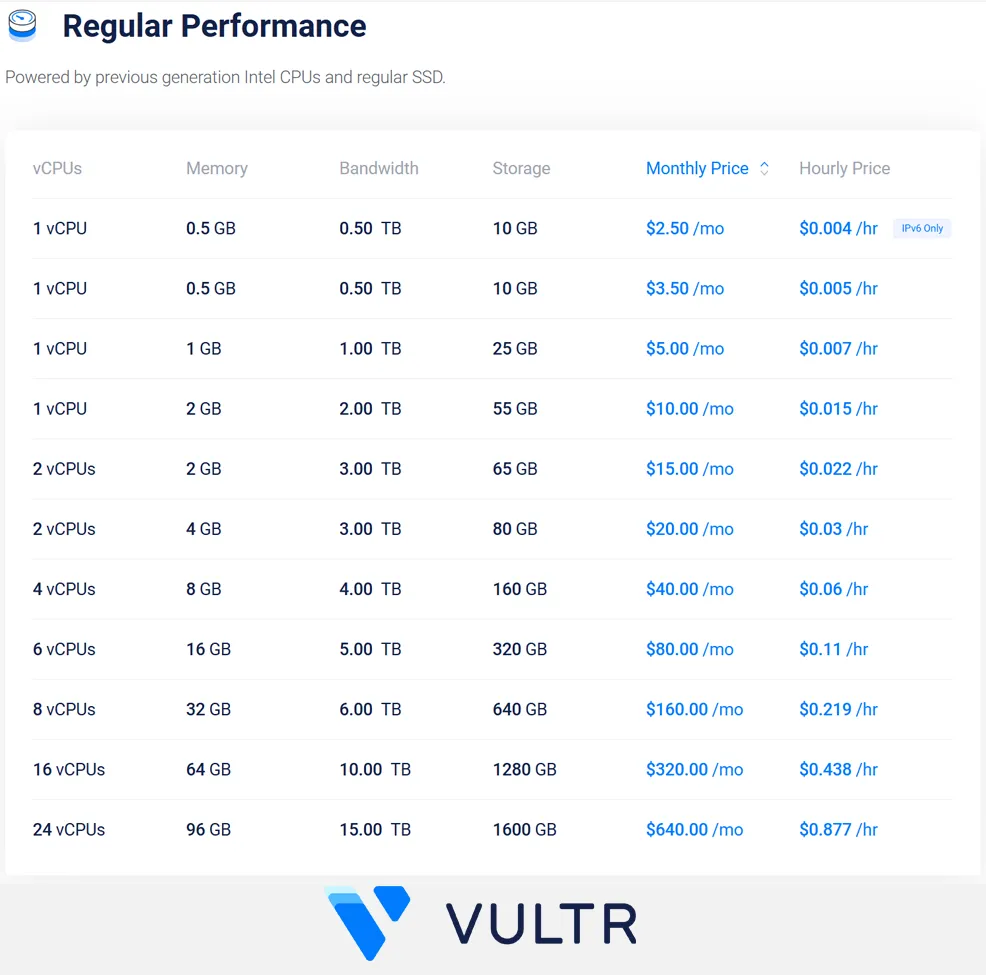
Vultr’s lowest listed Cloud Compute plan starts at $2.50/month for 1 vCPU, 0.5 GB RAM, 10 GB storage, and 0.5 TB bandwidth. The more practical low-end plan for many users is the $5/month regular Cloud Compute instance with 1 vCPU, 1 GB RAM, 25 GB storage, and 1 TB bandwidth. If you want newer hardware and NVMe storage, both High Performance and High Frequency start at $6/month.
Pricing Structure and Cost Considerations
One of Vultr’s advantages is that its pricing is more straightforward than the deep-discount introductory model used by many mainstream web hosts. Core compute products are generally listed with both hourly and monthly pricing, which is useful for temporary projects, testing environments, burst workloads, and short-lived deployments. That said, buyers still need to understand the differences between shared-vCPU, dedicated-vCPU, storage-inclusive, and block-storage-backed plans, because the catalog is broad enough to get confusing if you only focus on the first price you see.
There are also workload-level cost details to consider. Backups, snapshots, networking add-ons, DDoS protection, and related cloud services can change your effective monthly spend. In other words, Vultr can be inexpensive at the low end, but the real value depends on matching the right plan family to the right workload rather than choosing by headline price alone.
Value Assessment
For developers and self-managed users, Vultr often delivers strong value. You get fast provisioning, a wide spread of instance sizes, good location choice, API and Terraform support, and the ability to pay for what you actually use. For people who want shared hosting simplicity, managed WordPress convenience, or white-glove support, the value case is weaker because Vultr expects you to handle much more yourself. Overall, Vultr is strongest when viewed as affordable and flexible infrastructure, not as a hand-holding website host.
| Plan Tier | Starting Price | Key Resources | Best For |
|---|---|---|---|
| Regular Cloud Compute | $2.50/mo | Shared vCPU, 0.5 GB RAM, 10 GB storage, 0.5 TB bandwidth on the smallest plan | Tiny test instances, ultra-light sites, dev environments, experiments |
| High Performance | $6.00/mo | Newer AMD EPYC or Intel Xeon CPUs, NVMe SSD, 1 vCPU, 1 GB RAM, 25 GB storage, 2 TB bandwidth | Small production apps, websites, APIs, users who want stronger low-end performance |
| High Frequency | $6.00/mo | 3GHz+ Intel Xeon CPUs, NVMe SSD, 1 vCPU, 1 GB RAM, 32 GB storage, 1 TB bandwidth | Latency-sensitive web workloads, app servers, and performance-conscious VPS users |
| Optimized Cloud Compute | $28.00/mo | Dedicated AMD EPYC vCPUs; CPU, general-purpose, memory, and storage optimized variants | Business apps, databases, CI/CD, and heavier production environments |
| VX1 | $43.80/mo | Dedicated-resource cloud compute with newer performance positioning and enterprise/cloud-native focus | Cloud-native apps, growing teams, and higher-performance dedicated workloads |
Pricing note: Vultr does not follow the classic bargain-host pattern of ultra-low introductory rates followed by dramatic renewals on its core cloud compute offerings. The more important issue is understanding the difference between its many instance families and optional add-on costs.
Ready to try Vultr?
If your priority is flexible cloud infrastructure with good location coverage and self-managed VPS options at competitive prices, Vultr may be worth a closer look. Review the latest plans, features, and pricing directly on the provider’s site before signing up.
Performance and Speed
Performance is one of Vultr’s stronger selling points, but it depends heavily on which plan family you choose. The cheapest regular Cloud Compute plans are shared-vCPU machines intended for lighter workloads, so they should be evaluated like budget VPS instances rather than premium dedicated infrastructure. Once you move into High Performance, High Frequency, or dedicated-resource tiers, Vultr becomes much more compelling for production use.
The platform clearly segments its products around workload needs. High Performance plans use newer AMD EPYC or Intel Xeon CPUs with NVMe storage, while High Frequency plans are tuned for clock speed and responsive application performance. Dedicated tiers add more predictable compute allocation, which matters for databases, API stacks, analytics, build pipelines, and business workloads that do not tolerate noisy-neighbor behavior as well as a small personal site might.
In practical terms, Vultr should be more than capable for many websites, apps, and infrastructure services if you size correctly. The main mistake would be expecting a $2.50 or $5 shared-vCPU instance to behave like a premium managed cloud environment under real production pressure.
Ease of Use and Setup
For a cloud platform, Vultr is relatively approachable. Its console is clean, instance deployment is fast, and many users specifically praise the interface for making common tasks feel simpler than they do on heavier enterprise clouds. That matters because there is a big difference between “developer-focused” and “needlessly complicated,” and Vultr generally lands on the better side of that line.
Setup is straightforward for anyone who has launched a VPS before. You choose a region, operating system or marketplace app, server size, and optional extras such as backups. From there, you connect over SSH or your preferred management workflow and configure the stack yourself. That is much easier than wrestling with an overly complex hyperscaler dashboard, but it is still not the same as a beginner shared host that bundles email, one-click website workflows, and polished site-level onboarding.
The key caution is simple: Vultr is easy by cloud standards, not by novice web-hosting standards. If you are not comfortable managing a server, “easy to deploy” and “easy to operate” are not the same thing.
Developer and Advanced Features
This is one of Vultr’s clearest strengths. The platform supports API and Terraform workflows, custom ISOs, snapshots, backups, flexible deployment options, marketplace applications, and a range of compute profiles that make it practical for developers and technical teams. That gives users far more control than they would get from an entry-level shared host or beginner website builder platform.
Vultr also provides a strong migration path as needs evolve. A project can start on low-cost Cloud Compute, move into High Performance or High Frequency for better responsiveness, and later graduate to dedicated-resource optimized plans, VX1, or even bare metal depending on the workload. That kind of ladder is useful for agencies, SaaS builders, and operators who want to stay in one ecosystem without being trapped in a single beginner tier forever.
In short, Vultr is much more of a developer-first environment than a consumer-first one. That is one of its biggest advantages, but also one of the reasons it will not be the right fit for every buyer.
Security, SSL, and Backups
Vultr includes platform-level capabilities such as DDoS mitigation, firewall options, snapshots, and scheduled backups, which help create a solid infrastructure baseline. However, because most Vultr compute products are self-managed, buyers should not assume the same kind of bundled security stack they might get from a managed WordPress host or premium managed cloud provider.
SSL is a good example. On a self-managed VPS, SSL is generally something you configure at the server, application, or reverse-proxy layer rather than a free site-level perk that is automatically abstracted away for you. Backups also need careful attention. Vultr offers backup and snapshot tooling, but serious production users should still think in terms of a layered backup strategy, off-instance copies, and tested recovery workflows.
For technically capable users, this is normal and reasonable. For beginners, it may feel like more operational responsibility than expected.
Customer Support
Support is one of the more mixed parts of Vultr’s reputation. On the positive side, users often praise the documentation, the general usability of the platform, and the fact that day-to-day tasks are simple enough that many customers do not need frequent support interaction. On review platforms, praise also commonly centers on ease of setup and clear pricing.
The downside is that support sentiment becomes less flattering when users run into urgent, unusual, or account-related problems. Reddit discussions and review summaries regularly mention slow ticket responses, billing friction, occasional frustration with issue handling, and dissatisfaction during outages or approvals. That does not mean support is universally poor, but it does mean Vultr is usually a better fit for customers who can solve most infrastructure problems themselves.
Overall, support is best described as functional rather than concierge-level. If white-glove support is a top priority, Vultr may not be your best option.
Scalability and Flexibility
Scalability is a real advantage for Vultr. The platform offers a clear path from tiny experimental instances to faster shared plans, then onward to dedicated-resource compute, bare metal, and adjacent services like block storage, object storage, load balancing, CDN, and GPUs. That gives users meaningful room to grow without forcing an early jump to a hyperscaler.
Just as importantly, Vultr’s global footprint and API-driven model make horizontal scaling more realistic than it would be on a traditional hosting provider. If your needs are moving from “simple VPS” into “distributed application stack,” Vultr is much better positioned than a basic web host. It still is not a full hyperscaler in terms of product depth, but for many teams that is actually part of the appeal.
Scalability takeaway: Vultr is best suited for users who want a practical path from a low-cost self-managed VPS into faster, more capable cloud infrastructure without immediately moving to a more complex and expensive enterprise cloud platform.
Data Centers and Global Reach
Global reach is one of Vultr’s strongest differentiators. The company lists 32 cloud regions, including locations across the United States, Canada, Europe, Latin America, Asia, Australia, Africa, and the Middle East. That is a meaningful advantage for projects where latency, geographic targeting, or regional redundancy matters.
For web applications, game servers, APIs, client projects, and self-hosted services, region choice can make a real difference in user experience. Vultr’s footprint is broad enough that many buyers can get closer to their audience without paying hyperscaler-level prices. It is still smart to verify that the exact plan family or service you want is available in your preferred region, but the overall location story is one of Vultr’s biggest strengths.
Who Is Vultr Best For?
Best For
- Developers who want self-managed VPS or cloud compute with API-friendly workflows
- Agencies and freelancers deploying websites, applications, or client infrastructure
- Self-hosters and technically comfortable users who do not need traditional shared hosting
- Small businesses running custom web apps, APIs, or Linux-based workloads
- Teams that value broad region choice and a straightforward upgrade path
Not Ideal For
- Beginners who want classic shared hosting, cPanel, or heavily guided onboarding
- Users who need premium hand-holding support during outages or configuration issues
- Shoppers looking for bundled email, website builder, convenience, and all-in-one site management
- Projects that require highly managed enterprise cloud services or advanced compliance-heavy infrastructure
Ready to try Vultr?
If your priority is flexible cloud infrastructure with good location coverage and self-managed VPS options at competitive prices, Vultr may be worth a closer look. Review the latest plans, features, and pricing directly on the provider’s site before signing up.
How We Evaluated Vultr
For this review, we considered Vultr’s compute lineup, published pricing, infrastructure segmentation, deployment model, usability, developer tooling, backup and security options, support patterns, growth path, and overall value for the kinds of users most likely to consider a self-managed cloud VPS platform.
We also looked at broader user sentiment and reviewer patterns to identify where Vultr appears strongest in practice, and where complaints tend to cluster, particularly around support responsiveness, account friction, network incidents, and the reputational fallout from the 2024 ToS controversy.
Scoring Breakdown
| Category | Score |
|---|---|
| Performance | 8.8/10 |
| Ease of Use | 8.7/10 |
| Pricing/Value | 9.0/10 |
| Features | 9.1/10 |
| Security/Backup | 8.3/10 |
| Support | 7.6/10 |
| Scalability | 9.2/10 |
| Overall | 8.7/10 |
Top Alternatives to Vultr
If Vultr does not seem like the right fit, you may also want to consider alternatives such as Cloudways, ScalaHosting, and SiteGround. Cloudways is a better fit for users who want cloud performance without fully managing the server stack themselves, ScalaHosting can appeal to buyers who want VPS growth options with stronger hand-holding, and SiteGround is often the better choice for users who care more about managed convenience and support than raw infrastructure flexibility.
Final Verdict
Vultr is a strong option for developers, agencies, self-hosters, and technically capable businesses that want affordable and flexible cloud infrastructure with a broad global reach.
Its biggest strengths are plan variety, transparent pricing, ease of deployment, and a clear path from low-cost instances to faster and more capable dedicated-resource infrastructure. Its biggest weaknesses are that it is not designed as a beginner shared host, and its support reputation is not strong enough to make it the safest choice for users who expect premium assistance when something goes wrong.
For many of you, that tradeoff will make sense. If your goal is to run self-managed websites, apps, APIs, or development environments on a flexible VPS platform, Vultr is one of the more compelling choices in its segment. If your priority is guided onboarding, bundled site management, or top-tier support, you should compare more managed alternatives before committing.
Ready to try Vultr?
If your priority is flexible cloud infrastructure with good location coverage and self-managed VPS options at competitive prices, Vultr may be worth a closer look. Review the latest plans, features, and pricing directly on the provider’s site before signing up.
Frequently Asked Questions
Is Vultr good for beginners?
Vultr is beginner-friendly by cloud platform standards, but it is not the same as a traditional beginner web host. It is a better fit for users who are comfortable managing a server than for people who want a shared hosting dashboard with lots of built-in hand-holding.
Does Vultr offer VPS or cloud hosting?
Yes. Vultr’s core business is cloud compute and VPS-style hosting, with both shared-vCPU and dedicated-resource options. It also offers bare metal, storage, networking services, and GPUs.
Is Vultr expensive?
Not necessarily. Vultr can be very affordable at the low end, with regular Cloud Compute starting at $2.50/month and more performance-oriented plans starting at $6/month. The more important question is whether you choose the right plan family for your workload and account for add-ons like backups or storage.
Does Vultr include free SSL and backups?
Not in the same bundled way many shared hosts do. Because Vultr is primarily self-managed infrastructure, SSL is usually something you configure yourself at the server or application layer. Backup tools are available, including snapshots and automatic backups, but they should be treated as part of a broader backup strategy.
Who should choose Vultr over competitors?
Vultr is a strong choice for users who want a self-managed VPS or cloud platform with broad region choice, flexible pricing, and room to grow into faster or more specialized infrastructure. It is especially appealing for custom websites, applications, APIs, test environments, and developer-driven projects.
Editorial note: Hosting plans, pricing, features, and policies can change over time. Before signing up, always confirm the latest details directly on the provider’s site.