
Our Google Cloud Web Hosting Review & Analysis for 2026
 By:
By: Table of Contents
- Quick Facts
- What Is Google Cloud Web Hosting?
- Plans, Pricing, and Overall Value
- Performance and Speed
- Ease of Use and Setup
- Developer and Advanced Features
- Security, SSL, and Backups
- Customer Support
- Scalability and Flexibility
- Data Centers and Global Reach
- Who Is Google Cloud Best For?
- How We Evaluated Google Cloud
- Scoring Breakdown
- Top Alternatives
- Final Verdict
- Frequently Asked Questions
Pros
- Broad hosting options for static sites, serverless apps, containers, WordPress, and full VM deployments
- Excellent infrastructure quality with autoscaling, global networking, and enterprise-grade reliability tooling
- Strong built-in security capabilities, including IAM, HTTPS options, DDoS-related protections, and monitoring tools
- Very good fit for modern app deployment, APIs, custom stacks, and growth-oriented workloads
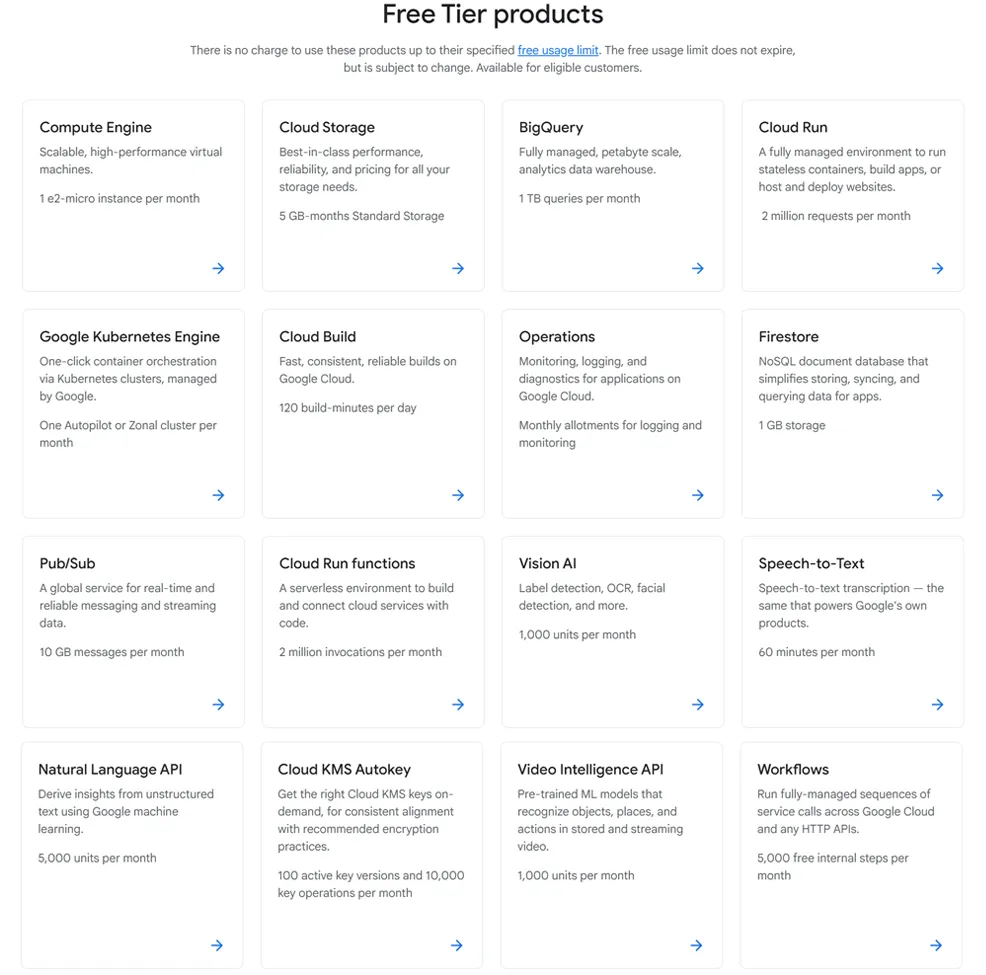
- Free credits for new customers and free usage tiers on several relevant products
- Positive sentiment from technical users who value flexibility, performance, and deep ecosystem integrations
Cons
- Pricing is usage-based and can be much harder to predict than flat-rate hosting
- Not beginner-friendly in the same way as shared hosting providers with cPanel-style workflows
- Unexpected charges are a recurring concern in user discussions, especially around networking and misconfiguration
- Support quality depends heavily on plan level, and advanced support can become expensive
- Overkill for many simple personal sites that would cost less on a conventional host
Ready to try Google Cloud?
If your priority is scalable infrastructure, flexible deployment options, and access to one of the strongest cloud ecosystems in the market, Google Cloud is worth a close look. Review the latest products, calculators, and pricing details directly on the provider’s site before launching a project.
Quick Facts
| Provider | Google Cloud |
|---|---|
| Hosting Type | Cloud Run, Compute Engine, Firebase Hosting, Firebase App Hosting, WordPress on Compute Engine, GKE-based hosting |
| Starting Price | Usage-based; free credits and free tiers available on selected products |
| Renewal Price | No traditional renewal model; ongoing costs depend on usage, region, resources, storage, and network transfer |
| Billing Style | Pay-as-you-go with product-specific pricing, optional committed use discounts on eligible services |
| Storage | Varies by product, including persistent disks, Cloud Storage, Firebase Hosting storage, and external managed databases |
| CPU/RAM | Explicitly configurable on Compute Engine and Cloud Run; differs by machine type, service settings, and architecture choice |
| Control Panel | Google Cloud Console plus product-specific tools and CLI workflows |
| Managed Hosting Available | Yes |
| Root Access | Yes, on Compute Engine virtual machines |
| Data Center Locations | Broad global region footprint across North America, South America, Europe, Asia, Australia, and the Middle East |
| Uptime SLA | Varies by product and architecture; no single site-hosting SLA applies across all services |
| Free SSL | Yes, depending on product and configuration, including Firebase Hosting custom domains and HTTPS-based services |
| Backups | Available, but not universally bundled; depends on product design and user configuration |
| Support | Documentation, community resources, and paid support tiers; experience varies by support plan |
| Best For | Developers, modern web apps, APIs, scalable sites, custom infrastructure, and businesses that need flexibility |
Bottom line: Google Cloud is a strong web hosting platform for users who want flexibility, scale, and modern cloud capabilities rather than a simple shared-hosting subscription. Its main tradeoff is complexity: pricing, architecture choices, and ongoing management are significantly less straightforward than what most beginners get from a traditional hosting brand.
What Is Google Cloud Web Hosting?
Google Cloud web hosting is not a single hosting package. It is a collection of cloud services that can be used to host websites, web apps, APIs, and content-driven platforms in different ways depending on your technical needs. Google’s own web-hosting materials highlight Cloud Run for dynamic applications, Firebase Hosting for static sites, Firebase App Hosting for modern full-stack apps, and Compute Engine for users who want direct VM-level control.
That product mix makes Google Cloud fundamentally different from companies built around shared hosting. Instead of choosing between a few fixed plans, users choose the architecture first and then pay according to the resources they consume. That can be a major advantage for growing or custom workloads, but it also means setup and budgeting require more attention.
Plans, Pricing, and Overall Value
Plan Types
Google Cloud does not organize hosting around one simple ladder of shared, VPS, and cloud plans. Instead, the practical hosting paths include Firebase Hosting for static sites, Firebase App Hosting for newer full-stack frameworks, Cloud Run for serverless containers and APIs, Compute Engine for custom virtual machines, and preconfigured WordPress or LAMP deployments on Compute Engine. For more advanced teams, GKE also exists as a container orchestration option, though it is usually beyond what most readers mean by standard web hosting.
Entry-Level Pricing
At the low end, Firebase Hosting can be very inexpensive for lightweight static projects because it includes a free allocation of hosting storage and data transfer before paid usage begins. Firebase pricing lists Hosting with 10 GB of storage included and 360 MB per day of data transfer before paid rates apply, while App Hosting includes 10 GiB per month of no-cost outgoing bandwidth before paid usage starts. That gives Google Cloud a viable low-cost entry point for certain kinds of sites, even though it does not look like a classic budget host.
Cloud Run can also start cheaply for light workloads because it includes monthly free allowances for CPU, memory, and requests. Google’s pricing page shows request-based billing with 180,000 vCPU-seconds, 360,000 GiB-seconds, and 2 million requests free per month in the free tier baseline, after which usage-based rates apply.
Renewal Pricing and Hidden Costs
There is no traditional renewal jump in the shared-hosting sense, but that does not mean costs are simple. Google Cloud pricing is ongoing usage-based billing. Your actual cost depends on region, product choice, resource sizing, request volume, storage, logging, networking, data transfer, and whether you keep services always-on or let them scale down. Cloud Run also notes that outbound internet transfer, VPC usage, and related services can create separate charges beyond the core compute bill.
This is the biggest pricing caution with Google Cloud. Many technical users like the flexibility, but community discussion frequently points to surprise bills, confusing network charges, and the need for careful monitoring. In other words, Google Cloud often rewards disciplined configuration, but it is not the easiest platform for people who want one predictable hosting invoice every month.
Value Assessment
For modern applications, custom stacks, APIs, and growth-ready infrastructure, Google Cloud can offer excellent value. Cloud Run avoids paying for idle server capacity in many scenarios, Firebase can be efficient for static or app-oriented frontends, and Compute Engine gives granular control over server resources. On the other hand, for a simple brochure website or hobby blog, the platform often provides more power than needed and may be harder to justify than a conventional host.
| Plan Tier | Starting Price | Key Resources | Best For |
|---|---|---|---|
| Firebase Hosting | Free tier available; then usage-based | 10 GB hosting storage included before overages, daily transfer allowance, custom domains, HTTPS, global CDN delivery | Static sites, frontend projects, landing pages, lightweight web apps |
| Cloud Run | Free tier available; then pay per request, CPU, and memory usage | 2 million requests free monthly on request-based billing baseline, autoscaling containers, configurable CPU and memory | Dynamic apps, APIs, server-rendered sites, containerized web services |
| Compute Engine | Usage-based; depends on VM family, region, disks, and networking | Custom or predefined VMs, root access, persistent disks, full server control, WordPress and LAMP deployment options | Custom stacks, VPS-style hosting, migrations, advanced workloads |
| Firebase App Hosting | Usage-based after included allowances | Global CDN, autoscaled containers, GitHub deployment workflow, framework-oriented hosting model | Modern full-stack web apps and frontend-heavy developer workflows |
Pricing note: Google Cloud is often more cost-efficient for bursty or scalable workloads than people expect, but it is also easier to misprice than traditional hosting. Readers should use the pricing calculator and examine egress, logging, storage, and idle-resource behavior before committing.
Ready to try Google Cloud?
If your priority is scalable infrastructure, flexible deployment options, and access to one of the strongest cloud ecosystems in the market, Google Cloud is worth a close look. Review the latest products, calculators, and pricing details directly on the provider’s site before launching a project.
Performance and Speed
Performance is one of Google Cloud’s strongest areas. The platform is built around the same broader infrastructure family Google uses for major internet-scale services, and its architecture guidance emphasizes reliability, scalability, load balancing, CDN integration, and distributed delivery. For hosting, that translates into very strong performance potential when services are chosen and configured appropriately.
Cloud Run can scale automatically based on demand, Firebase Hosting serves static content through a global CDN, and Compute Engine can be paired with load balancing and Cloud CDN for more customized performance tuning. The important nuance is that Google Cloud gives you strong performance building blocks, but your actual results depend heavily on architecture decisions rather than a provider simply promising “fast hosting” out of the box.
For static sites, CDN-backed delivery can feel extremely fast. For dynamic apps and APIs, Cloud Run is often an attractive option because it combines managed scaling with modern deployment patterns. For traffic-heavy, performance-sensitive applications, Compute Engine or more advanced multi-service architectures may be more appropriate than relying on a one-size-fits-all setup.
Ease of Use and Setup
Ease of use is not Google Cloud’s main selling point. It is much easier to understand if you already know the difference between static hosting, virtual machines, managed containers, and cloud storage. The Google Cloud Console is capable and polished, but it serves a much broader infrastructure audience than a beginner-friendly shared-hosting dashboard, which means the experience can feel overwhelming to first-time site owners.
That said, not every path is equally complex. Firebase Hosting is relatively straightforward for static sites, and Google also offers click-to-deploy options such as WordPress or LAMP on Compute Engine. Cloud Run sits in the middle: simpler than hand-managing virtual machines, but still more technical than traditional one-click hosting. For beginners, Google Cloud is usable, but not naturally beginner-first.
The practical question is not whether Google Cloud can host a website. It clearly can. The real question is whether the user wants a cloud platform experience or a website-host experience. Those are not the same thing.
Developer and Advanced Features
This is where Google Cloud becomes especially compelling. Developers can choose from serverless hosting, VM hosting, container hosting, Kubernetes orchestration, managed databases, object storage, load balancing, observability tooling, and infrastructure automation paths. Cloud Run supports popular languages and frameworks, Compute Engine supports highly customized stacks, and Google’s architecture materials describe straightforward paths for moving from VM-based infrastructure toward more advanced cloud-native designs.
There is also strong flexibility around deployment style. Teams can use the console, CLI tools, infrastructure-as-code workflows, and GitHub-connected app workflows depending on the product. For custom web applications, APIs, or migration projects, Google Cloud is much more powerful than most mainstream web hosts. The tradeoff is that users are expected to make more architectural decisions themselves.
For WordPress specifically, Google Cloud supports both Compute Engine deployments and more customized combinations such as WordPress with GKE and Cloud SQL. That is useful for technical teams, but it is less turnkey than premium managed WordPress hosts that abstract away most infrastructure decisions.
Security, SSL, and Backups
Security is one of Google Cloud’s major strengths, but it is important to understand how that strength works in practice. The platform provides a strong shared-responsibility foundation that includes IAM, logging and monitoring, load-balancing options, HTTPS support, and product-level security features. Firebase Hosting includes SSL support for custom domains, and Google’s web-serving architecture documents emphasize observability and managed service integrations that help reduce operational friction.
Cloud Run also benefits from managed infrastructure, built-in scaling, and automatic routing behavior, which can reduce the operational burden compared with self-managed servers. For more advanced needs, users can layer services like Cloud Armor, Cloud Load Balancing, Cloud CDN, firewall rules, VPC controls, and monitoring alerts into their hosting stack.
The caveat is backups. Unlike many traditional hosting companies, Google Cloud does not package “daily backups included” as a universal hosting feature across every product. Backup behavior depends on what you build. Compute Engine disks, databases, storage, and app content all need to be protected according to the architecture you choose. Google Cloud can support excellent resilience, but it usually requires more intentional setup than mass-market hosting.
Customer Support
Support is one of the more mixed areas in the Google Cloud hosting experience. Google offers extensive documentation, tutorials, architecture guides, product references, and paid support options, but this is not the same kind of support model most consumers expect from a hosting company that specializes in onboarding small business site owners.
For technical teams, the documentation and ecosystem are often a major asset. For smaller users, the challenge is that getting personalized help may require paid support plans, and support pricing can scale upward quickly. Third-party summaries of Google Cloud support pricing also highlight that serious support can become expensive compared with low-cost web hosts.
User sentiment reflects that divide. Developers who are comfortable researching and debugging on their own often view the platform positively. Less technical users tend to be more critical when billing, configuration, or troubleshooting becomes complex.
Scalability and Flexibility
Scalability is one of Google Cloud’s biggest advantages. The platform’s own hosting guidance describes a clear spectrum: static hosting for simple sites, Cloud Run for serverless scaling, Compute Engine with autoscaling and managed instance groups for VM-based growth, and GKE for container orchestration at a higher level of complexity. In other words, users are not boxed into one narrow hosting model.
That makes Google Cloud especially attractive for businesses that expect to evolve. A project might start as a static site, grow into a dynamic app, and later add APIs, databases, CDN distribution, load balancing, and observability tooling without needing to leave the ecosystem. This is an area where Google Cloud generally outclasses traditional shared hosts.
Scalability takeaway: Google Cloud is one of the stronger choices for projects that may need to grow from a simple website into a more complex application stack, because its hosting options range from lightweight static delivery to highly customized and autoscaled infrastructure.
Data Centers and Global Reach
Google Cloud has a broad global footprint, and its product pricing and architecture documentation list regions across North America, South America, Europe, Asia-Pacific, and the Middle East. Cloud Run’s pricing page alone lists many global regions, including Iowa, Oregon, Northern Virginia, London, Frankfurt, Belgium, Tokyo, Singapore, Sydney, Toronto, Sao Paulo, and more.
That reach matters for both latency and resilience. Firebase Hosting also emphasizes global CDN delivery, while Compute Engine and Cloud Run can be paired with load balancing and multi-region strategies depending on your architecture. For international businesses or services with geographically distributed users, this is one of Google Cloud’s clear strengths.
As always, product availability, pricing, and architecture options vary by region, so users should confirm the exact regions supported for the services they plan to use.
Who Is Google Cloud Best For?
Best For
- Developers building web apps, APIs, or containerized services
- Businesses that need scalable infrastructure and room for architectural growth
- Teams that want serverless hosting or highly customizable VM-based hosting
- Projects that benefit from Google’s global infrastructure, CDN, and observability tooling
- Technical users who prefer flexibility over the simplicity of shared hosting
Not Ideal For
- Beginners who want a simple shared-hosting dashboard and one fixed monthly price
- Very small hobby sites that do not need cloud-scale flexibility
- Users who are uncomfortable monitoring usage-based billing closely
- Buyers who expect all backups, support, and management tasks to be bundled by default
Ready to try Google Cloud?
If your priority is scalable infrastructure, flexible deployment options, and access to one of the strongest cloud ecosystems in the market, Google Cloud is worth a close look. Review the latest products, calculators, and pricing details directly on the provider’s site before launching a project.
How We Evaluated Google Cloud
For this review, we considered Google Cloud’s hosting product range, usage-based pricing structure, infrastructure flexibility, deployment paths, security tooling, support model, global footprint, and suitability for both simple and advanced website hosting scenarios.
We also looked at how Google positions its own hosting services, how its documentation frames the tradeoffs between Compute Engine, Cloud Run, Firebase Hosting, and other options, and how user sentiment tends to cluster around strengths such as scalability and complaints such as billing complexity.
Scoring Breakdown
| Category | Score |
|---|---|
| Performance | 9.3/10 |
| Ease of Use | 7.1/10 |
| Pricing/Value | 8.0/10 |
| Features | 9.5/10 |
| Security/Backup | 9.1/10 |
| Support | 7.8/10 |
| Scalability | 9.7/10 |
| Overall | 8.7/10 |
Top Alternatives to Google Cloud
If Google Cloud does not feel like the right fit, readers may also want to consider alternatives such as AWS Hosting, DigitalOcean, and Cloudways. AWS is a direct enterprise cloud rival with a broader but similarly complex ecosystem, DigitalOcean is often easier for smaller teams that want simpler cloud infrastructure, and Cloudways can appeal to users who want cloud-like performance with a more managed hosting experience.
Final Verdict
Google Cloud is a very strong hosting platform for developers, businesses, and technically comfortable teams that need flexibility, scalability, and access to mature cloud infrastructure.
Its biggest strengths are breadth of hosting options, global infrastructure, deep developer capabilities, and a strong security and observability foundation. Its biggest weaknesses are pricing complexity, a steeper setup curve, and the fact that it does not behave like a beginner-focused web host.
For many users building modern applications or growth-oriented websites, that tradeoff is absolutely worth it. For others, especially readers who want the simplest possible path to launching a small site with a fixed monthly bill, a more traditional hosting provider may be the better fit. Google Cloud is best viewed as a cloud platform that can host websites extremely well, not as a conventional low-friction website host.
Ready to try Google Cloud?
If your priority is scalable infrastructure, flexible deployment options, and access to one of the strongest cloud ecosystems in the market, Google Cloud is worth a close look. Review the latest products, calculators, and pricing details directly on the provider’s site before launching a project.
Frequently Asked Questions
Is Google Cloud good for beginners?
It can be, but only in certain paths such as Firebase Hosting or simple preconfigured deployments. Overall, Google Cloud is better suited to users who are comfortable with cloud concepts, usage-based billing, and more technical setup than a traditional shared hosting account usually requires.
Does Google Cloud offer VPS or server-style hosting?
Yes. Compute Engine is Google Cloud’s VM-based hosting option and is the closest equivalent to VPS hosting. It provides configurable virtual machines, persistent disks, operating system choice, and root access.
Is Google Cloud expensive?
It depends on the workload and how well the environment is configured. For lightweight static sites or efficient serverless apps, costs can be low. For always-on servers, high traffic, large data transfer, or poorly managed services, costs can rise quickly.
Does Google Cloud include free SSL and backups?
SSL is available on several relevant hosting paths, including Firebase Hosting custom domains and HTTPS-based services. Backups are not packaged as one universal included feature across all hosting products, so users need to plan backup strategy according to the service and architecture they deploy.
Who should choose Google Cloud over traditional hosting providers?
Google Cloud is a strong choice for users who want scalable infrastructure, serverless deployment options, custom stacks, global reach, and room to build beyond a simple website. It is especially appealing for modern web apps, APIs, startups, technical teams, and businesses that expect growth or architectural complexity over time.
Editorial note: Hosting products, usage pricing, support plans, regions, and platform policies can change over time. Before launching a project, always confirm the latest details directly on the provider’s site and estimate your likely costs using the official calculator.